Table of Contents
A crowded desk can make even a simple workday feel frustrating. Your monitor takes up the back of the desk, notebooks compete for space, and your keyboard sits right where you’d rather be working.
An under desk keyboard tray can help solve part of that problem.
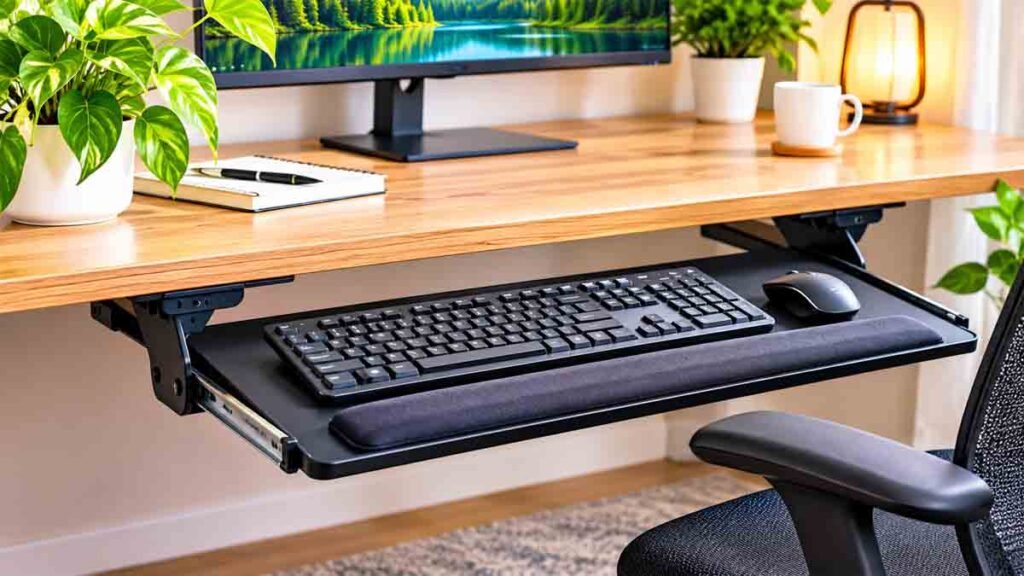
Instead of keeping your keyboard directly on the desktop, a tray provides a dedicated platform underneath it. Some models slide out when needed, while others offer adjustable height, tilt, or a separate area for your mouse.
But buying the right tray involves more than choosing something that fits beneath your desk.
A poorly positioned tray can make typing uncomfortable, reduce legroom, or interfere with your office chair. Meanwhile, an appropriately selected model may improve keyboard placement and free up valuable desktop space.
This guide explains how to choose an under desk keyboard tray, compares popular mounting styles, and covers 11 practical tips for creating a workspace that suits your equipment and working habits.
Whether you’re upgrading a small home office, organizing a computer desk, or considering accessories for a standing desk, here’s what you should know before buying.
What Is an Under Desk Keyboard Tray?
An under desk keyboard tray is a platform installed beneath a desk to hold a computer keyboard and, depending on its size, a mouse.
Most models attach to the underside or front edge of a desktop.
The platform may slide outward when you’re ready to type and retract when you’re finished.
Other designs use adjustable support arms that let you change the keyboard’s height, angle, or position.
The main purpose is to provide a separate typing surface.
This can be useful when the main desktop is too high for comfortable keyboard use, when space is limited, or when you want to keep the desk surface clear.
However, not every keyboard tray offers the same adjustments.
A basic sliding tray may only move forward and backward. A more adjustable ergonomic keyboard tray can offer additional height and tilt controls.
That difference matters when choosing a model for your particular workstation.
Are Under Desk Keyboard Trays Worth It?
An under desk keyboard tray can be worth considering if your existing desk makes it difficult to place your keyboard comfortably.
For example, a fixed-height desk may position your keyboard too high relative to your seated elbow height.
Lowering the keyboard using a suitable tray may help improve its position.
A keyboard tray can also free up desktop space.
This is useful for small apartments, shared offices, and workstations that need room for writing or other activities.
However, keyboard trays aren’t necessary for everyone.
If your desk already adjusts to a comfortable typing height and provides sufficient space for your keyboard and mouse, an additional tray might offer little advantage.
It can even create problems if its mounting hardware interferes with your knees or chair.
The most useful question isn’t whether keyboard trays are generally good.
It’s whether one will improve your actual desk setup.
11 Smart Under Desk Keyboard Tray Tips
1. Measure Your Desk Before Buying
The first step is to measure the space beneath your desktop.
A keyboard tray under desk installation needs enough width, depth, and clearance for the entire mounting system.
Start by checking the distance between the desk legs.
Next, measure the usable depth beneath the desk, especially if the model uses a sliding track.
Look for obstacles such as:
- Desktop support beams
- Storage drawers
- Metal crossbars
- Cable trays
- Desk control boxes
- Other under-desk accessories
These components can prevent a tray from mounting correctly even when the desktop appears wide enough.
You should also measure the thickness of the desktop.
Clamp-on products usually support a specified range of desktop thicknesses. Screw-mounted designs may require a minimum thickness or particular material.
Always compare your measurements with the manufacturer’s installation requirements.
Practical tip: Measure the usable mounting area, not just the desk’s overall width.
2. Choose Between Clamp-On and Screw-Mounted Trays
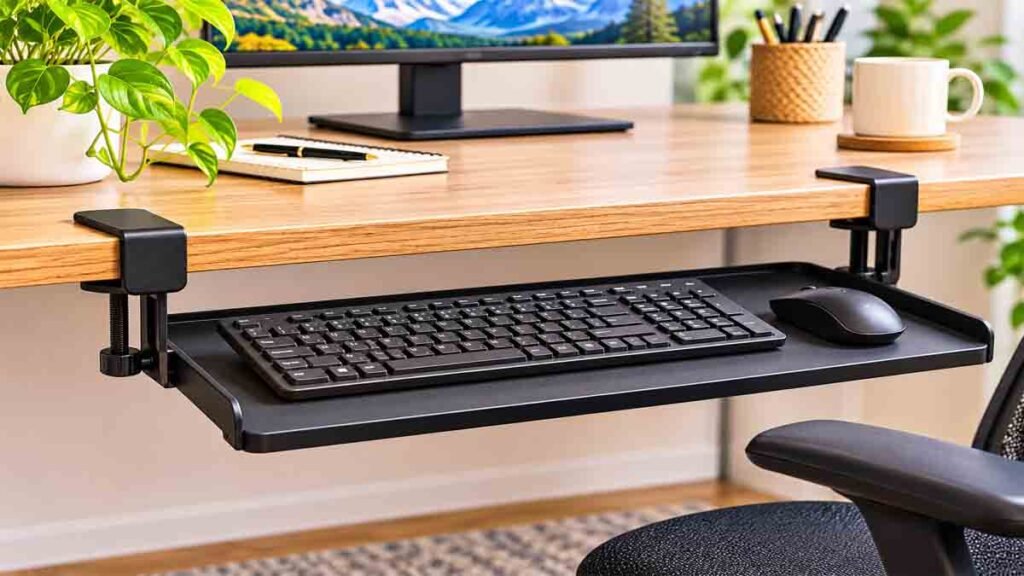
Two popular options are clamp-on keyboard trays and screw-mounted keyboard trays.
Neither is automatically better.
The appropriate choice depends on the desk, the adjustments you need, and whether permanent installation is acceptable.
Clamp-On Keyboard Trays
A clamp-on under desk keyboard tray attaches to the front edge of a compatible desktop.
Many designs require no drilling.
They can be useful for renters, temporary offices, or people who prefer removable accessories.
However, clamps may extend above or below the desktop.
This can affect comfort, desk appearance, or compatibility with certain edge shapes.
Some clamp-on models provide only a fixed drop below the desk rather than true height adjustment.
Screw-Mounted Keyboard Trays
Screw-mounted models typically attach beneath the desktop using brackets or a track.
They can provide a relatively discreet appearance.
Certain models also support more extensive height, tilt, or swivel adjustment.
However, installation requires a suitable desktop and appropriate mounting hardware.
Drilling is not advisable for every surface, particularly some hollow-core, glass, or thin composite desktops.
Follow the manufacturer’s instructions and avoid installing hardware where it may damage the furniture.
3. Check the Tray Width and Mouse Space
A tray that fits your keyboard but leaves no space for your mouse may be inconvenient.
Before purchasing, measure the full width of your keyboard.
Then consider how much space you need for mouse movement.
A compact keyboard may fit comfortably on a relatively narrow tray.
A full-size keyboard with a number pad requires more space.
If you use a large mouse or prefer wide mouse movements, allow additional room.
Some keyboard trays feature a separate mouse platform.
Others use one large continuous surface.
A separate mouse platform can be useful, provided it allows the mouse to remain close to the keyboard at a suitable height.
Avoid designs that force you to reach far sideways whenever you use your mouse.
For a more compact arrangement, you might also consider a smaller keyboard without a built-in number pad.
Buying tip: Compare usable tray dimensions rather than relying on product names such as “large” or “extra wide.”
4. Look for Height Adjustment

Keyboard height is one of the most important considerations.
The U.S. Occupational Safety and Health Administration recommends arranging computer workstations so that shoulders remain relaxed, elbows stay near the body, and wrists remain in a neutral position.
If your keyboard is too high, you may raise your shoulders or bend your wrists awkwardly.
If it’s too low, you may lean forward or place your arms at an uncomfortable angle.
An adjustable keyboard tray can make positioning easier.
However, some models advertised as adjustable only allow the tray to slide or change position within a limited range.
Check the actual vertical adjustment specification.
Compare that range with your seated elbow height and the height of your desk.
For fixed desks, a model with genuine vertical adjustment may be more useful than a basic pull-out shelf.
Source: OSHA Computer Workstation Keyboard Guidance
5. Consider Tilt Adjustment
Some under desk keyboard tray models allow the platform to tilt.
This feature can help users position the keyboard at a comfortable angle.
A steep upward keyboard angle may force the wrists into an awkward position.
For some workstations, a slight negative tilt can help keep the hands and forearms better aligned.
However, the most comfortable setting depends on your chair height, keyboard design, arm position, and individual needs.
Avoid choosing a tilt angle simply because it looks ergonomic.
Instead, look for a position in which your wrists remain relatively straight and your shoulders stay relaxed.
A tray with easy tilt adjustment is particularly useful when several people share the same workstation.
The adjustment mechanism should also hold its position securely during typing.
6. Make Sure the Tray Doesn’t Reduce Legroom
An under desk keyboard tray should improve your workspace, not make it harder to sit comfortably.
Check how far the tray and its mounting components extend beneath the desktop.
Some products include brackets, tracks, or adjustment mechanisms that occupy space near your knees.
This can become a problem when using an office chair with armrests or when moving between different sitting positions.
The tray should not press against your thighs or prevent you from moving your legs naturally.
Check both the retracted and extended positions.
If the tray can swivel or lower, consider its full movement range.
This is especially important for compact desks where the available under-desk space is already limited.
For workstations with drawers or a central support structure, confirm compatibility before ordering.
7. Choose a Stable Sliding Mechanism
Not all sliding keyboard trays feel equally secure.
A poorly constructed tray may wobble, rattle, or move while you’re typing.
Stability is particularly important when you’re using a full-size keyboard or working for extended periods.
Look for models with a suitable rated load capacity and secure mounting system.
Check how the tray locks or stops in its extended position.
It should be easy to pull out without excessive force.
You should also be able to retract it without catching cables or hitting nearby furniture.
For adjustable-arm trays, confirm that the support mechanism can hold the platform at its selected position.
Avoid placing additional equipment on the tray unless the manufacturer specifically supports that use.
A stable keyboard tray provides a more predictable typing surface.
8. Plan Your Keyboard and Mouse Cables
Cable management is easy to overlook when shopping for a keyboard tray.
A sliding or adjustable tray moves independently of the desktop.
If your keyboard or mouse uses a wired connection, the cable arrangement must accommodate that movement.
Make sure connections don’t become stretched when the tray extends.
Keep cords away from sliding tracks, hinges, or other pinch points.
Wireless keyboards can reduce the number of moving cables, although they still require charging or battery management.
For wired devices, compatible cable clips or loose routing arrangements may help keep connections organized.
Don’t tightly bind cables to moving components.
You should also be able to remove or replace your keyboard without dismantling the entire setup.
Related reading: 15 Smart Under Desk Cable Management Ideas for a Clean Workspace on ApnarChoice.com.
9. Consider a Tray for Your Standing Desk
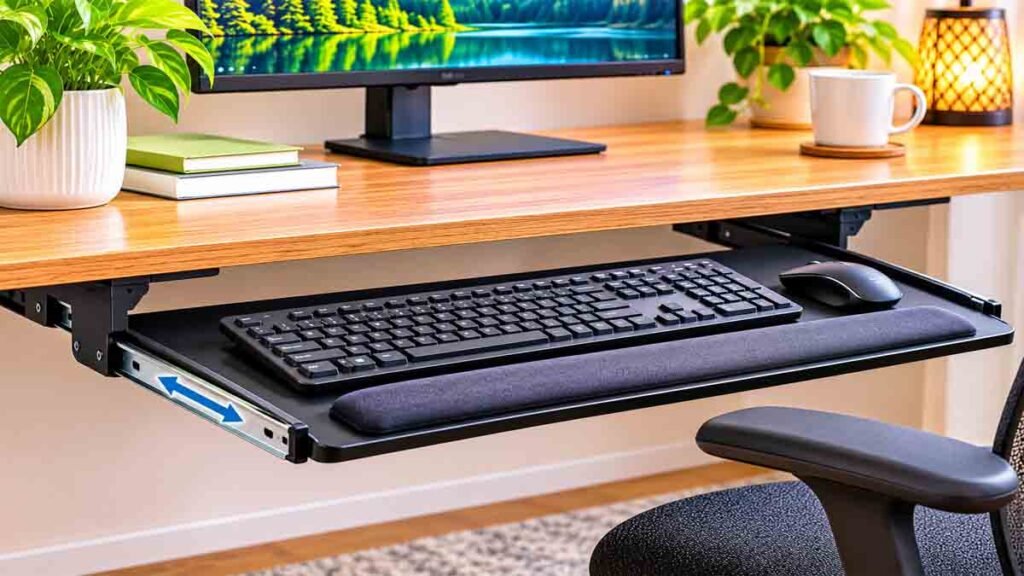
An under desk keyboard tray isn’t limited to traditional office furniture.
It may also work with certain height-adjustable standing desks.
However, compatibility requires more careful attention.
Many standing desks have support frames, lifting columns, control boxes, or cable-management accessories beneath the desktop.
These components may obstruct the tray’s mounting area.
The added weight and mounting hardware must also comply with the desk manufacturer’s requirements.
If your standing desk already lowers to a suitable typing height, a separate keyboard tray may not be necessary.
A poorly selected tray could make the desk harder to use by reducing knee clearance in the seated position.
Before purchasing, check whether the tray is compatible with your standing desk model.
Consider the desk’s full height range and inspect how the tray would operate at different positions.
If you use a standing desk primarily to switch between sitting and standing, easy adjustment becomes particularly valuable.
If you’re new to height-adjustable workstations, read our guide on what a standing desk is to understand how these desks work and whether they’re suitable for your workspace.
10. Think About Installation and Maintenance
Some keyboard trays are relatively simple to attach.
Others require more complex mounting systems and precise alignment.
Choose a product with clear manufacturer instructions and hardware suitable for your desk.
Before installing anything, confirm the exact mounting location and check for hidden structural components or electrical parts.
A clamp-on model may be preferable if you cannot modify the desk.
For screw-mounted products, follow the installation instructions and use appropriate professional assistance when necessary.
After installation, inspect the tray periodically.
Make sure mounting components remain secure, moving parts operate normally, and cables stay clear of mechanisms.
Don’t continue using a tray that appears loose, damaged, or unstable.
A well-maintained tray is easier to use and less likely to create inconvenience.
11. Choose Features You’ll Actually Use
Keyboard trays come with different combinations of features.
Some offer:
- Sliding platforms
- Adjustable height
- Tilt controls
- Swivel mechanisms
- Separate mouse platforms
- Wrist-support surfaces
- Removable mounting systems
It’s tempting to buy the product with the longest feature list.
But additional mechanisms can increase cost, installation complexity, and the space required beneath the desk.
Consider your normal working habits.
If you only want to move your keyboard out of the way, a simple sliding tray may be sufficient.
If your desk is too high for comfortable typing, height adjustment should be a priority.
If you frequently change sitting positions or share a desk, easy adjustment may be more important.
The best under desk keyboard tray is the one that fits your workstation and addresses a specific need.
Clamp-On vs Sliding vs Adjustable Keyboard Trays
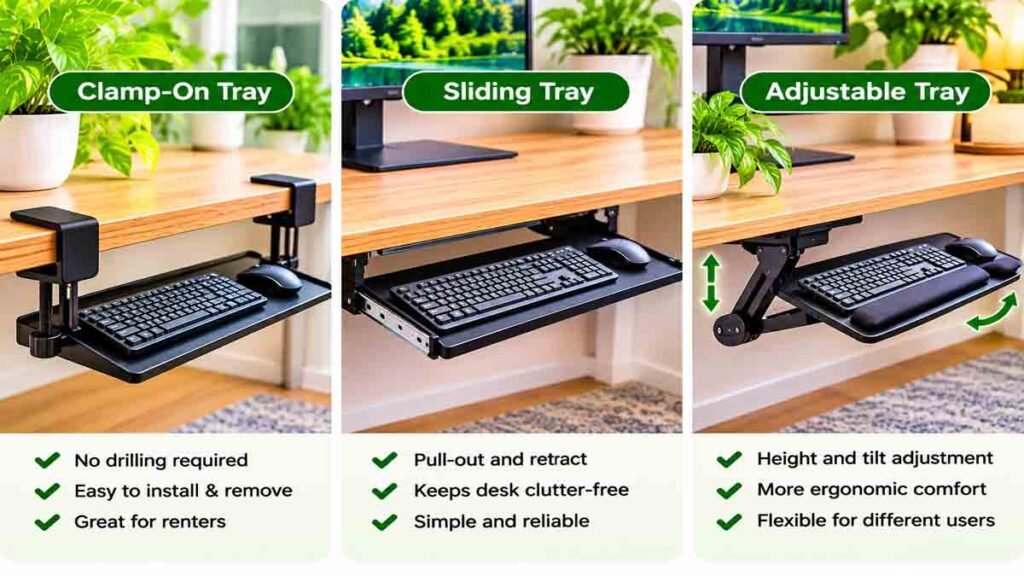
Different mounting systems serve different purposes.
| Feature | Clamp-On Tray | Basic Sliding Tray | Ergonomic Adjustable Tray |
|---|---|---|---|
| Main advantage | Removable mounting | Simple storage | More positioning options |
| Drilling required | Usually no | Often yes | Depends on model |
| Height adjustment | Limited or model-specific | Usually fixed | Often available |
| Tilt adjustment | Model-specific | Usually unavailable | Often available |
| Good for renters | Often | Less suitable | Depends on mounting |
| Installation complexity | Usually lower | Moderate | Varies |
| Main consideration | Desk edge compatibility | Mounting clearance | Adjustment range and stability |
These are general product categories. Individual models may differ significantly.
For example, some clamp-on trays offer height adjustment, while some ergonomic models require permanent installation.
Always check the actual specifications rather than assuming that every product in one category has identical features.
How to Choose the Right Keyboard Tray Size
Keyboard tray dimensions should match the equipment you plan to place on the platform.
Start by measuring your keyboard.
Then determine how much additional surface area is needed for your mouse.
A typical full-size keyboard may require substantially more width than a compact keyboard.
The tray’s depth matters too.
There should be enough room to position your hands comfortably without the keyboard sitting awkwardly against the front edge.
If you’re considering a separate mouse platform, make sure it can be positioned close to the keyboard.
Practical Measurement Checklist
| Measurement | What to Check |
|---|---|
| Keyboard width | Full width of your actual keyboard |
| Mouse space | Comfortable movement area |
| Tray depth | Space for keyboard and hand positioning |
| Desktop thickness | Compatibility with clamps or screws |
| Under-desk depth | Space for tracks and mechanisms |
| Knee clearance | Room for comfortable sitting |
| Vertical adjustment | Ability to reach a suitable typing height |
Don’t rely solely on the advertised tray width.
Check whether the manufacturer’s dimensions refer to the entire product or the usable keyboard surface.
Under Desk Keyboard Tray for Small Spaces
A keyboard tray can make a small desk more versatile.
When the keyboard isn’t in use, some models slide beneath the desktop and leave the main surface available for writing, studying, or other tasks.
This can be especially helpful in apartment home offices and multipurpose rooms.
However, a sliding tray doesn’t automatically create more usable space.
The mounting hardware occupies room beneath the desk, and the tray may extend into the area used by your chair.
A compact workstation should balance storage with comfortable movement.
If your desk is narrow, consider a tray that accommodates a compact keyboard and mouse without requiring an oversized platform.
If you frequently move your workstation, a removable clamp-on design may be easier to manage than a permanently mounted track system.
Keep the overall layout simple.
A keyboard tray works best when it supports the way you actually use the desk.
Under Desk Keyboard Tray vs Keyboard on the Desktop
Should you use a keyboard tray or leave your keyboard on the main desktop?
Both options can work.
The answer depends on your desk height, available space, and typing position.
Keyboard on the Desktop
This arrangement offers a simple setup without additional mounting hardware.
It’s often suitable for adjustable desks that can be positioned at an appropriate typing height.
The keyboard and mouse remain easy to move, clean, and replace.
However, they occupy desktop space.
Keyboard on a Tray
A keyboard tray provides a separate surface.
It may help when a fixed desk is too high or when you need more space on top.
Some adjustable trays offer greater flexibility for keyboard positioning.
The trade-offs include installation requirements, possible wobble, and reduced under-desk clearance.
The better option is the one that allows comfortable keyboard placement without creating new workspace problems.
Common Keyboard Tray Buying Mistakes
A little planning can prevent several frustrating problems.
Buying Without Measuring
A tray may fit the desktop width but collide with a support beam or drawer.
Measure all relevant mounting dimensions.
Choosing Too Narrow a Tray
If there’s no adequate room for your mouse, you may end up reaching awkwardly between the tray and desktop.
Assuming Sliding Means Height-Adjustable
A basic pull-out tray may have no vertical adjustment.
Read the specifications carefully.
Ignoring Chair Armrests
Armrests can interfere with the desk edge or tray position.
Check clearance before purchasing.
Forgetting Cable Movement
Wired devices need enough freedom for the tray’s intended movement.
Choosing Appearance Over Stability
An attractive design isn’t useful if the platform shifts while typing.
Expecting a Tray to Fix Every Ergonomic Problem
Keyboard placement is only one part of a workstation.
Chair positioning, monitor placement, desk height, and regular movement also matter.
Under Desk Keyboard Tray Buying Checklist
Before ordering an under desk keyboard tray, confirm the following:
- The mounting system is suitable for your desk.
- The tray fits your keyboard and mouse.
- The available adjustment range meets your needs.
- The platform is stable during normal use.
- The installation will not obstruct legroom.
- The tray will not interfere with existing desk accessories.
- Wired connections can move safely with the tray.
- The manufacturer’s load rating suits your equipment.
- The installation instructions are clear.
- The product can be maintained or removed when necessary.
Taking these measurements before buying is much easier than returning an incompatible product.
Frequently Asked Questions
What is the best under desk keyboard tray?
The best under desk keyboard tray depends on your desk and working needs. A clamp-on model may suit renters, while a height- and tilt-adjustable model may be more appropriate when ergonomic positioning is the main concern.
Is a keyboard tray better than typing on the desk?
Not necessarily. If your desk is already at a comfortable typing height, keeping the keyboard on the desktop may work well. A keyboard tray is more useful when you need a different keyboard height or additional desktop space.
Can I install a keyboard tray without drilling?
Yes. Certain clamp-on keyboard trays attach to compatible desk edges without drilling. Check the supported desktop thickness, edge shape, and clearance requirements.
Do keyboard trays help with wrist positioning?
An appropriately adjusted tray may help you position your keyboard so your wrists remain relatively straight. However, the benefit depends on the tray’s adjustability and the rest of your workstation.
Will an under desk keyboard tray fit a standing desk?
Some models are compatible with standing desks, but not all. Check the desk frame, mounting space, load requirements, and movement clearance before buying.
How wide should a keyboard tray be?
It should accommodate your keyboard and provide adequate space for your mouse or include a suitable separate mouse platform. Measure your actual equipment before choosing a tray.
Are sliding keyboard trays adjustable?
Some are, but many basic sliding trays only move in and out. Height, tilt, and swivel adjustment are separate features that must be verified in the product specifications.
Can a keyboard tray reduce desktop clutter?
Yes. A retractable tray can move a keyboard and mouse beneath the desk when they’re not needed. However, it should not reduce legroom or create accessibility problems.
Do I need a wrist rest with my keyboard tray?
Not everyone needs one. A wrist or palm rest may be useful in some setups, but it should not encourage excessive pressure on the wrists during typing. Keyboard height and hand position should be considered first.
Can I use a full-size keyboard on an under-desk tray?
Yes, if the tray has sufficient usable width and depth and supports the keyboard’s weight. Check whether there’s also room for your mouse.
Final Thoughts
An under desk keyboard tray can be a useful addition to a home office, especially when your desktop is too high for comfortable typing or you need more usable space.
But choosing the right model takes a little planning.
Measure your desk, check your keyboard and mouse dimensions, and decide whether you need simple sliding storage or genuine ergonomic adjustment.
A clamp-on tray may be convenient for a temporary setup. A screw-mounted or adjustable design may provide more positioning options when the desk is suitable.
Most importantly, make sure your choice fits your body position, equipment, and daily routine.
A good under desk keyboard tray should make your workspace easier to use, not introduce another obstacle beneath the desk.