On This Page
A standing desk with storage can solve one of the most frustrating home office problems: finding enough room for everyday essentials without covering your entire work surface.
A height-adjustable desk is useful for switching between sitting and standing. But where do you put your notebooks, chargers, pens, paperwork, and office supplies?
Traditional desks often include drawers and cabinets. Many adjustable desks, however, prioritize a clean desktop and moving frame over built-in storage.
Fortunately, there are practical alternatives.
You can choose a standing desk with drawers, add storage beneath the desktop, install suitable accessories, or pair an adjustable workstation with a separate cabinet.
The important part is making sure your storage doesn’t interfere with legroom, desk movement, or comfortable working positions.
This guide covers 11 standing desk with storage designs, helpful dimensions, storage comparisons, and buying tips for American apartments, bedrooms, and dedicated home offices.
What Is a Standing Desk With Storage?
A standing desk with storage is a height-adjustable workstation that includes built-in storage or works with compatible storage accessories.
Some designs have shallow drawers directly beneath the desktop. Others include raised shelves, side compartments, pegboards, or removable organizers.
A separate rolling cabinet can also provide storage beside an adjustable desk, although it isn’t technically part of the desk itself.
These arrangements serve different needs.
A shallow drawer may be perfect for pens and notebooks. Someone who regularly handles paperwork may prefer a filing cabinet. A dual-monitor user might benefit from a raised monitor shelf with storage beneath it.
The right setup depends on what you use, how often you need it, and how much room you have.
Quick answer: For a compact home office, a standing desk with a shallow built-in drawer is a convenient starting point. For larger storage needs, a height-adjustable desk paired with a separate cabinet often offers more flexibility.
11 Smart Standing Desk With Storage Designs
1. Standing Desk With Built-In Drawers

A standing desk with drawers keeps everyday essentials within easy reach while maintaining a relatively clean desktop.
Built-in drawers are typically attached beneath the work surface, so they rise and lower with the desk.
This makes them convenient for storing pens, charging cables, notebooks, sticky notes, and other small supplies.
However, many integrated drawers are shallower than those found in traditional office furniture.
Check the internal drawer dimensions rather than assuming it will accommodate thick notebooks or file folders.
The drawer also occupies space beneath the desktop, potentially reducing thigh clearance when sitting.
Best for: Remote workers who want compact, concealed storage.
Buying tip: Measure from the floor to the bottom of the drawer at the desk’s lowest working height.
2. Standing Desk With a Raised Monitor Shelf
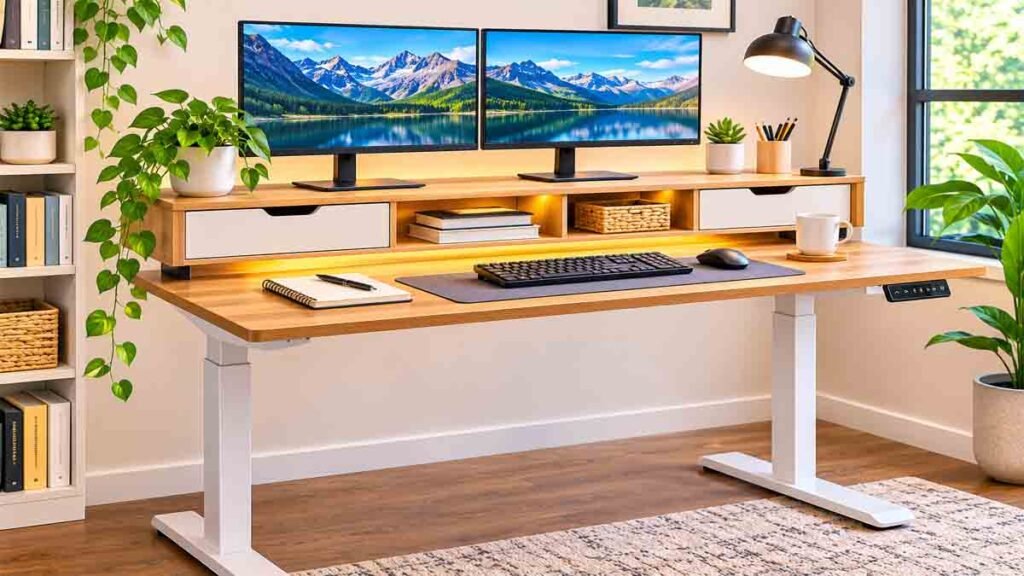
A raised monitor shelf creates additional storage space between the main desktop and the monitor platform.
You can use this area for a keyboard, notebook, or small office accessories, depending on the shelf’s design.
The arrangement can help separate your main working area from less frequently used items.
It may also provide a place for a compact drawer or organizer without occupying knee space.
However, monitor height needs careful attention.
A raised shelf isn’t automatically ergonomic. If it positions the screen too high, you may need a different monitor arrangement.
Best for: Single-monitor workstations and people who want an organized desktop.
Buying tip: Check the shelf height, monitor compatibility, and your seated eye level.
3. Standing Desk With Side Storage Shelves
Side shelves provide storage without placing drawers directly in front of your knees.
They can hold notebooks, small containers, and lightweight office supplies.
Some adjustable desks have shelves integrated into their frames, while others use compatible side-mounted accessories.
This configuration can be useful when you frequently reach for materials throughout the workday.
But placement matters.
A shelf that extends beyond the desk may interfere with nearby furniture, walls, or walking space.
Best for: Home offices with enough space beside the desk.
Buying tip: Confirm that side storage won’t collide with furniture when the desk changes height.
4. Standing Desk With a Rolling File Cabinet
A rolling file cabinet is one of the most flexible storage solutions for an adjustable desk.
Unlike built-in drawers, the cabinet remains on the floor when the desktop rises.
You can move it beside the desk when standing or position it elsewhere in the room.
This is particularly useful if you store documents, folders, or larger office supplies.
A cabinet with lockable casters can help keep it stationary during normal use.
However, a cabinet placed beneath the desk may interfere with your knees or prevent the desk from reaching its lowest position.
Best for: Remote professionals who handle paperwork or need substantial storage.
Buying tip: Compare cabinet height with the desk’s lowest position, including the frame and any crossbars.
5. Standing Desk With an Under-Desk Drawer
An under-desk drawer is a practical accessory when your existing adjustable desk doesn’t include storage.
These drawers are available in different sizes and mounting styles.
Some attach with screws, while others use compatible brackets or mounting systems.
They are useful for small items that otherwise accumulate around the keyboard.
Before installation, inspect the underside of the desktop.
Avoid drilling into electrical components, control boxes, cables, or unsupported sections of the surface.
Also check the manufacturer’s guidance because modifications can affect warranties or desk operation.
Best for: People upgrading an existing standing desk.
Buying tip: Verify desktop material, mounting compatibility, drawer load capacity, and available knee clearance.
6. Standing Desk With a Pegboard Organizer
A pegboard organizer provides vertical storage for lightweight accessories.
Instead of leaving headphones, small stationery containers, or cables on the desktop, you can arrange them on hooks and holders.
Some pegboards attach to compatible desk frames. Others mount on a nearby wall.
Wall-mounted pegboards remain stationary as the desk moves, while desk-mounted organizers move with the desktop.
Each arrangement has advantages.
A stationary organizer may be better for items you don’t need constantly. A moving organizer keeps frequently used supplies at the same relative height as the work surface.
Best for: Creative workspaces, students, and compact home offices.
Buying tip: Follow mounting and weight-limit instructions, especially for desk-mounted accessories.
7. Compact Standing Desk With Storage for Small Spaces
A small standing desk with storage can work well in a bedroom, studio apartment, or shared living area.
A compact desktop encourages you to prioritize the equipment you actually use.
For a laptop-focused setup, a 40- to 48-inch-wide desk may be worth considering.
However, the required depth depends on your screen arrangement and viewing distance.
A small drawer or side organizer can provide enough storage for everyday accessories without adding a separate furniture unit.
Choose a simple design that coordinates with nearby furniture.
Best for: Apartments, bedrooms, and limited home office corners.
Buying tip: Measure the full desk footprint, including feet, side accessories, and movement clearance.
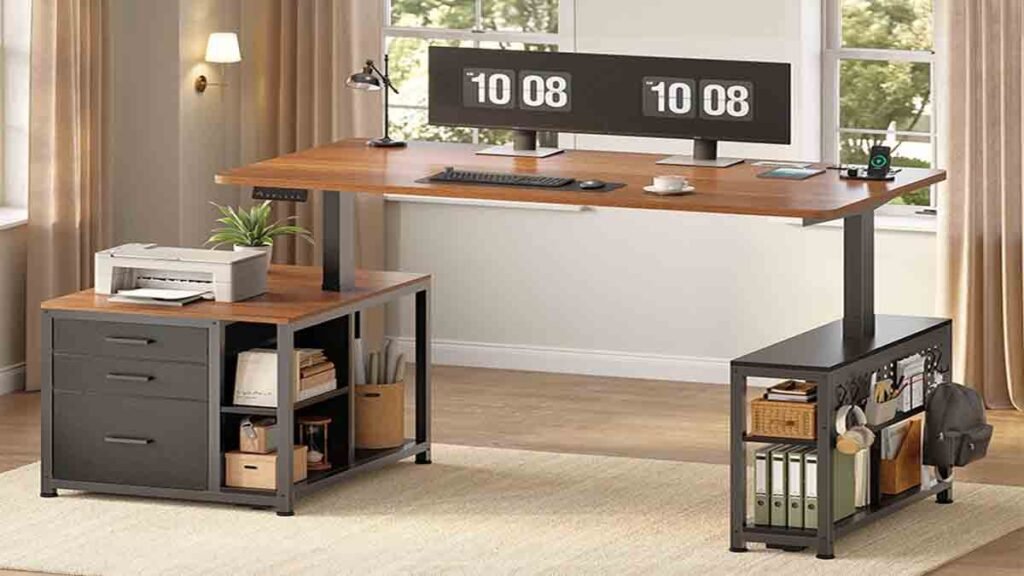
8. L-Shaped Standing Desk With Drawers
An L-shaped standing desk offers two connected work surfaces.
This arrangement can be useful for dual monitors, creative projects, or people who frequently switch between computer work and paperwork.
Drawers may be integrated beneath one section, leaving the main seating area relatively open.
Some designs also provide raised shelves or storage compartments.
The biggest challenge is fitting the desk into the room.
An L-shaped workstation needs sufficient space for the frame, chair movement, and nearby furniture.
Best for: Larger home offices and multitasking workstations.
Buying tip: Check whether the desk is reversible and confirm the position of the drawers before ordering.
9. Standing Desk With Fabric Storage Drawers
Fabric drawers are a lightweight alternative to traditional wooden or metal drawers.
They can provide useful storage for small accessories, notebooks, and lightweight supplies.
Some desk designs incorporate several fabric compartments beneath a raised shelf or along the back of the desktop.
The main advantage is flexible storage without a large cabinet.
However, fabric compartments may be less suitable for heavy equipment or frequently handled paperwork.
They can also collect dust and may require periodic cleaning.
Best for: Budget-conscious home offices and lightweight storage needs.
Buying tip: Check the stated load limit and whether the fabric compartments can be removed for cleaning.
10. Standing Desk With a Storage Hutch
A storage hutch adds shelves or compartments above the main desk surface.
This can be useful when you need more organization but don’t want to place drawers beneath the desktop.
A hutch may hold books, stationery, and decorative accessories.
However, it also increases the height and weight of the overall workstation.
A large overhead structure can affect monitor placement, create visual clutter, and add load to the lifting system.
Not every hutch is compatible with a height-adjustable desk.
Best for: Workstations with substantial vertical space and compatible storage systems.
Buying tip: Use only storage structures approved for the desk, and verify total loaded weight and stability.
11. Standing Desk With Modular Storage
Modular storage gives you the freedom to change your workspace over time.
You might begin with a simple height-adjustable desk and add a drawer, monitor shelf, cable tray, or separate cabinet later.
This approach works particularly well when you’re unsure how much storage you’ll eventually need.
It also lets you replace individual accessories rather than replacing the entire desk.
The downside is compatibility.
Accessories designed for one desk may not fit another because of different frame designs, desktop thicknesses, and mounting locations.
Best for: People who want a flexible home office setup.
Buying tip: Check accessory compatibility before purchasing the desk, especially if you plan to expand the setup later.
Standing Desk Storage Comparison: Which Design Is Best?
Different storage arrangements solve different problems.
The table below compares common options.
| Storage Design | Main Advantage | Main Limitation | Best For |
|---|---|---|---|
| Built-in drawer | Convenient hidden storage | May reduce knee clearance | Small essentials |
| Raised monitor shelf | Uses desktop space efficiently | Can affect monitor height | Compact workstations |
| Side shelves | Keeps central legroom open | Requires side clearance | Frequently used supplies |
| Rolling file cabinet | Larger storage capacity | Needs separate floor space | Documents and files |
| Under-desk drawer | Can upgrade an existing desk | Installation compatibility | Small accessories |
| Pegboard | Vertical organization | Limited load capacity | Creative supplies |
| Fabric drawers | Lightweight storage | Less suitable for heavy items | Budget setups |
| Storage hutch | More vertical capacity | Adds weight and height | Larger workspaces |
| Modular accessories | Flexible configuration | Compatibility varies | Long-term customization |
Our practical recommendation: Choose a built-in drawer if you mainly store small essentials. For files, books, and heavier office supplies, a separate cabinet is often more suitable.
What Size Standing Desk With Storage Do You Need?
Desk dimensions affect comfort, equipment placement, and the amount of usable storage.
A desk that looks spacious in a product photograph may feel crowded once you add a monitor, keyboard, and other equipment.
Standing Desk Width Comparison
These are approximate planning ranges, not fixed industry standards.
| Desk Width | Suitable Setup | Storage Considerations |
|---|---|---|
| 40 inches | Laptop and minimal accessories | Small drawer or organizer |
| 48 inches | Laptop plus external monitor | Compact built-in storage |
| 55 inches | Single monitor and paperwork | Drawer or side shelf |
| 60 inches | Larger monitor setup | More flexible storage |
| 72 inches | Multiple monitors and accessories | Space for modular organization |
The right width depends on the actual equipment you use.
A monitor arm may help free desktop space, but it must be compatible with the desk’s construction and weight limits.
How Deep Should a Standing Desk Be?
A 24-inch-deep desk may work for a compact setup, particularly with a laptop or suitable monitor arm.
A deeper surface provides more flexibility for larger monitors and documents.
OSHA recommends enough desktop depth to position a monitor at least 20 inches from the eyes.
If you use a large monitor, measure the complete screen and stand arrangement before choosing the desktop.
For more information about workstation dimensions, read our guide to standard desk height.
Check the Minimum and Maximum Height
A standing desk should adjust to a comfortable keyboard position when both sitting and standing.
The correct height varies by person.
Avoid choosing a desk solely because its maximum height looks impressive.
Check whether the minimum height works with your chair and whether the keyboard can sit near elbow level without raising your shoulders.
Storage drawers beneath the desktop may reduce the available space for your thighs.
Built-In Drawers vs. Separate Storage Cabinets
One of the most important buying decisions is whether to choose integrated storage or a separate cabinet.
Advantages of Built-In Drawers
Built-in drawers keep frequently used supplies close.
They move with the desk, so small items remain within easy reach when the desktop rises.
They can also help maintain a coordinated appearance.
However, integrated storage may limit flexibility.
You generally cannot reposition a built-in drawer without changing the desk itself.
Advantages of Separate Cabinets
A separate cabinet offers more storage capacity and can be positioned where it doesn’t interfere with the desk.
You can replace it independently, move it to another room, or choose a different configuration as your needs change.
The main disadvantage is the additional floor space.
A cabinet positioned beneath a desk must be checked carefully for clearance.
Which Is Better?
For pens, chargers, and small accessories, built-in drawers are convenient.
For files, larger supplies, and long-term storage, a separate cabinet usually offers greater flexibility.
If you need both, consider a shallow built-in drawer paired with a cabinet beside the workstation.
Electric vs. Manual Standing Desks With Storage
Height-adjustable desks generally use either an electric lifting mechanism or a manual adjustment system.
Electric Standing Desks
Electric models use motors to raise and lower the desktop.
Some include programmable height presets, which can make switching between preferred positions more convenient.
When evaluating electric desks with storage, check the total lifting capacity.
The desk must support the desktop, attached storage, equipment, and items inside the drawers.
Also consider stability at standing height and the manufacturer’s warranty.
Manual Standing Desks
Manual models use a crank or another adjustment mechanism.
They may suit people who change height less frequently or prefer a simpler setup.
However, adjustment can take more effort, especially with a heavily loaded workstation.
Storage accessories must not interfere with the crank or moving frame.
Which Should You Choose?
If you frequently alternate between sitting and standing, an electric model may be more convenient.
If you need a straightforward workstation and don’t adjust the height often, a manual desk may be sufficient.
Neither option is automatically better for everyone.
The quality of the frame, available height range, stability, and storage compatibility matter more than the adjustment method alone.
How to Choose a Standing Desk With Storage
Before buying, use this practical checklist.
1. Identify Your Storage Needs
Make a list of the items you use every day.
Separate them into small accessories, documents, and larger equipment.
This helps you decide whether you need a shallow drawer, side shelves, or a separate cabinet.
2. Measure Your Room
Measure the available floor area and account for nearby furniture.
Leave enough room to move your chair and access storage compartments.
If the desk sits near a wall shelf, window, or cabinet, verify its clearance at maximum height.
3. Check Knee and Thigh Clearance
Storage should never force you to sit too far away from the keyboard.
Measure the lowest point beneath the desktop, including drawers and frame components.
Make sure your knees and thighs have comfortable clearance at your seated working height.
4. Verify the Weight Capacity
A desk’s lifting capacity must account for everything it raises.
That includes monitors, accessories, storage compartments, and their contents.
Don’t assume a high lifting capacity automatically means the desk will remain equally stable at every height.
5. Examine Drawer Quality
Check the drawer dimensions, materials, runners, and weight rating.
A shallow drawer may be perfect for stationery but unsuitable for large accessories.
Look for practical construction rather than judging storage capacity from photographs.
6. Consider Cable Management
Height-adjustable desks need enough cable slack to move through their full range.
Cables should not become stretched, pinched, or caught in drawers.
Choose a compatible cable tray or routing system that keeps electrical components away from moving parts.
For a detailed setup guide, see our article on under-desk cable management.
7. Review Warranty and Assembly Requirements
Check what the warranty covers.
Some warranties distinguish between motors, electronic controls, desktop materials, and accessories.
Review assembly instructions before ordering, particularly if you plan to add storage later.
How to Organize a Standing Desk With Storage
A well-designed desk can still become cluttered without a simple organization system.
Start by removing everything from the work surface.
Keep only the equipment you use regularly.
Store small accessories in a drawer or organizer, placing frequently used items toward the front.
Use separate compartments for pens, charging accessories, and stationery.
Keep paper documents in a dedicated folder or cabinet rather than spreading them across the desktop.
If you use a rolling cabinet, position it where you can access it without twisting or repeatedly reaching.
Finally, test the desk at both sitting and standing heights.
Make sure storage remains accessible, cables move freely, and nothing interferes with the frame.
A few minutes of organization can make the workspace easier to maintain throughout the week.
Common Mistakes When Buying a Standing Desk With Drawers
Buying a Desk Without Measuring Legroom
A large drawer can reduce the space available beneath the desktop.
Check clearance at your preferred seated height before purchasing.
Assuming Every Drawer Holds Files
Many integrated drawers are designed for small accessories.
Check internal dimensions if you need to store folders or larger notebooks.
Ignoring Desk Stability
Storage adds weight.
An overloaded desk may perform differently from a lightly equipped workstation.
Follow the manufacturer’s load limits.
Installing Incompatible Accessories
An accessory that fits a traditional desk may interfere with the moving frame of a standing desk.
Use compatible mounting systems and avoid modifying structural or electrical components.
Placing a Cabinet in the Desk’s Travel Path
A floor-standing cabinet may collide with the desktop or frame when the desk lowers.
Test the complete movement range and keep the area clear.
Choosing Storage Before Planning the Monitor Setup
A raised shelf or hutch can interfere with proper screen positioning.
Plan your monitor height and viewing distance before choosing overhead storage.
Filling Every Available Compartment
More storage doesn’t necessarily mean a better workspace.
Keep the items you need most within easy reach and move rarely used supplies elsewhere.
Ergonomic Tips for a Standing Desk With Storage
An organized workstation should also support comfortable working positions.
According to OSHA’s computer workstation guidance, the desk should provide adequate leg clearance and allow the monitor, keyboard, and mouse to be positioned comfortably.
When typing, keep your shoulders relaxed and your wrists relatively straight.
Position frequently used accessories close enough that you don’t have to repeatedly stretch across the desk.
Avoid placing storage containers where they restrict your feet or chair.
Change positions throughout the day rather than remaining seated or standing for long periods without movement.
The University of Pennsylvania also recommends adjustable-height furniture because fixed desk heights do not suit everyone.
You can review the OSHA desk ergonomics guide and the University of Pennsylvania office furniture recommendations for additional guidance.
Frequently Asked Questions
Can you get a standing desk with built-in drawers?
Yes. Some height-adjustable desks include shallow built-in drawers, while others offer multiple storage compartments. Check the drawer dimensions and available legroom before purchasing.
Are standing desks with storage worth it?
They can be worthwhile if you regularly need office supplies close to your workstation. However, built-in storage isn’t essential for everyone. A separate cabinet or compatible organizer may offer better flexibility.
What is the best standing desk with storage for a small room?
A compact adjustable desk with a shallow drawer or suitable side organizer is often practical. Choose dimensions that accommodate your equipment while preserving comfortable walking and chair space.
Do standing desk drawers move up and down?
Drawers attached to the moving desktop generally rise and lower with it. A separate floor-standing cabinet stays in place.
Can I add drawers to an existing standing desk?
Sometimes. Compatible under-desk drawers can provide additional storage, but mounting requirements, frame clearance, desktop construction, and weight limits must be checked first.
Does a standing desk with drawers have less legroom?
It may. Drawers installed beneath the work surface occupy space that would otherwise be available for your thighs. The amount of clearance depends on the desk design and drawer dimensions.
Is a rolling cabinet better than built-in storage?
A rolling cabinet is often better for larger items and paperwork. Built-in storage is convenient for small essentials. The better option depends on your available space and daily needs.
What size standing desk is best for a home office?
A 48- to 60-inch-wide desk can be a useful starting point for many home office setups, but your monitor arrangement, room size, and storage needs determine the right dimensions.
Are electric standing desks better than manual desks?
Electric desks are generally more convenient for frequent height adjustments. Manual desks may be suitable when adjustments are less frequent. Compare stability, height range, weight capacity, and storage compatibility.
How do I keep cables organized on a standing desk with storage?
Use compatible cable-management accessories, keep wires away from moving parts, and allow sufficient slack for the full height range. Avoid routing cables through drawer mechanisms.
Final Thoughts
A standing desk with storage can make your home office more practical, but the best solution isn’t always the one with the most drawers.
For small accessories, a compact desk with a built-in drawer may be enough. If you need substantial storage, a separate rolling cabinet often provides more flexibility.
Side shelves, monitor risers, and modular organizers can also help you create a cleaner workspace without sacrificing valuable legroom.
Before buying, measure your space, check the desk’s height range, confirm storage dimensions, and make sure the entire setup remains comfortable when sitting and standing.
Choose storage that supports the way you actually work. A simple, well-organized setup is often more useful than a larger desk filled with compartments you rarely use.