
On This Page
A standing desk can make your home office more flexible, but keeping the workspace organized is another challenge. Pens, charging cables, notebooks, and small office supplies can quickly crowd the desktop.
A standing desk with drawers offers a practical solution by combining adjustable working height with convenient storage.
Instead of keeping every accessory on the desk, you can organize everyday essentials in built-in drawers or compatible storage compartments. The result can be a cleaner working area with fewer distractions.
However, choosing the right desk isn’t as simple as selecting the model with the most drawers.
Storage compartments can reduce legroom, increase the weight carried by the lifting mechanism, and interfere with accessories such as keyboard trays or monitor arms.
Some standing desks include integrated drawers, while others support optional storage accessories. You can also pair a height-adjustable desk with a separate mobile filing cabinet.
Each arrangement has advantages and limitations.
In this guide, you’ll learn how to choose a standing desk with drawers, compare different storage designs, avoid common buying mistakes, and find an arrangement that works for your home office.
What Is a Standing Desk With Drawers?
A standing desk with drawers is a height-adjustable workstation that includes integrated storage compartments or supports compatible drawer accessories.
The desk allows you to change the working surface between suitable seated and standing heights.
Its drawers provide a separate place for everyday office supplies.
Some designs feature one shallow drawer directly beneath the desktop. Others use side-mounted drawers or additional storage modules.
The drawer arrangement can affect how the desk looks, how much equipment it holds, and how comfortably you can sit.
A desk with built-in drawers isn’t the same as a desk paired with a freestanding filing cabinet.
Built-in or desktop-mounted drawers usually travel with the adjustable surface. A separate cabinet stays on the floor.
Understanding this difference is important because it affects storage access, available legroom, and desk movement.
If you’re new to adjustable workstations, read our guide on what is a standing desk to understand how these desks work and what to consider before choosing one.
Are Standing Desks With Drawers Worth It?
A standing desk with drawers can be a worthwhile choice when you want flexible working height and a more organized desktop.
Built-in storage can be useful for keeping small accessories within reach without leaving them scattered around your monitor and keyboard.
However, drawers aren’t essential for every workstation.
If you already have adequate storage nearby, a simpler standing desk may provide more flexibility and under-desk clearance.
Consider a drawer-equipped desk if you regularly use notebooks, cables, stationery, or other small accessories and prefer to keep them close.
A separate storage cabinet may be better if you need space for large files, binders, or bulky equipment.
The right decision depends on how you use your desk, not just how attractive a particular model looks.
11 Smart Tips for Choosing a Standing Desk With Drawers
1. Decide How Much Drawer Storage You Actually Need
Start by identifying the items you plan to store.
A shallow drawer may be enough for pens, sticky notes, small notebooks, and charging accessories.
But larger office supplies can require deeper storage.
Before shopping, make a short list of the items you use most often.
Think about their size, weight, and how frequently you need them.
For example, a home office primarily used for laptop work may need only one compact drawer.
A workstation used for paperwork, creative projects, and home administration may benefit from additional storage.
More drawers aren’t always better.
Extra storage can take up valuable room beneath the desktop, and a heavier desk may be less convenient to move or assemble.
Choose a standing desk with drawers that fits your actual storage needs rather than buying the largest available configuration.
2. Choose Between Built-In and Add-On Drawers
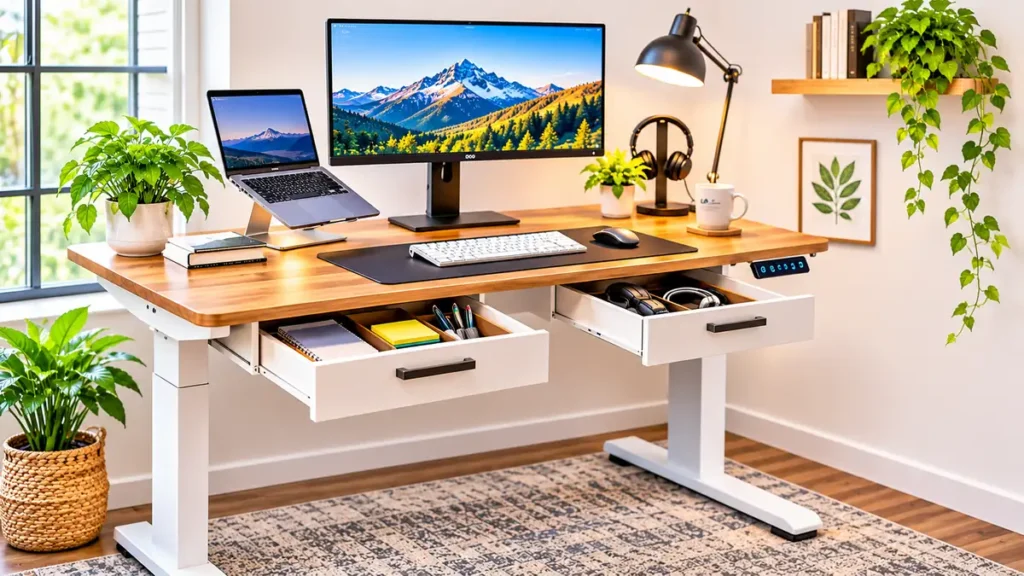
One of the most important buying decisions is whether to choose a desk with integrated drawers or add storage later.
Built-in drawers are designed as part of the desk’s original configuration.
They may offer a more consistent appearance and a defined storage location.
However, the drawer size and placement are often fixed.
Add-on drawers are separate accessories that attach to a compatible desk.
They can provide more flexibility, but compatibility must be confirmed.
Not every desk supports additional mounting hardware.
Some adjustable frames have support bars, control boxes, or cable-management components that interfere with accessory installation.
Adding storage may also affect the desk’s load capacity or warranty.
If you already own a standing desk, check the manufacturer’s approved accessories before purchasing a drawer.
If you’re buying a completely new workstation, an integrated design may be simpler when storage is a priority.
3. Check Knee and Thigh Clearance
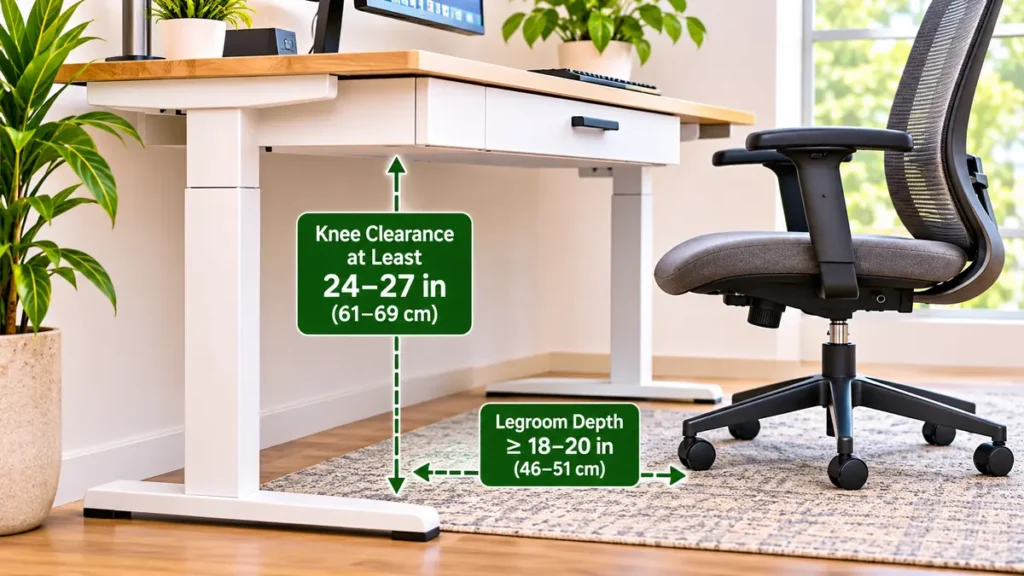
A drawer beneath the desktop reduces the available space between the work surface and your legs.
This is one of the most easily overlooked details when buying a standing desk with drawers.
A desk may have an excellent height-adjustment range but still feel uncomfortable if the drawer occupies too much space near your knees.
The Occupational Safety and Health Administration recommends maintaining sufficient clearance beneath computer workstations so users can adjust their seated positions comfortably.
When comparing desks, measure the distance from the floor to the lowest point of the drawer while the desk is at your intended sitting height.
Don’t rely only on the published desktop height.
Remember to consider the thickness of the desktop, drawer housing, mounting brackets, and any structural supports.
The storage compartment should not press against your thighs or restrict your normal sitting position.
If you use an office chair with armrests, check whether you can move close enough to the desk.
Practical tip: Compare the actual usable space beneath the drawer with the space your legs and chair require.
Source: OSHA Computer Workstations, Desks and Work Surfaces.
4. Compare the Desk’s Height Adjustment Range
A standing desk should support comfortable working positions while both seated and standing.
The advertised height range tells you how high and low the desktop can move.
However, the best range depends on your own workstation measurements.
A desk that doesn’t lower sufficiently may force you to raise your chair or adopt an uncomfortable typing position.
A desk that doesn’t rise high enough may lead you to lean forward while standing.
Choose a model whose adjustment range accommodates your intended keyboard position.
The keyboard should generally be positioned so your shoulders remain relaxed, your elbows stay close to your body, and your wrists remain relatively straight.
If the desk includes drawers, remember that storage components affect the clearance available in its lowered position.
A suitable standing desk with drawers should work comfortably at your normal seated height, not only when fully raised.
Before choosing an adjustable workstation, explore our standard desk height guide to understand desk measurements, comfortable keyboard positioning, and workspace planning.
5. Select the Right Desktop Size
Desktop size affects how much working space you have and how easily your equipment fits.
A smaller desk may suit a laptop, compact keyboard, and single monitor.
A larger surface may be more practical for dual monitors, document holders, or other accessories.
Consider both desktop width and depth.
Width determines how much equipment can be arranged side by side.
Depth affects monitor placement and the distance between your eyes and the screen.
OSHA’s computer workstation guidance recommends positioning monitors at an appropriate viewing distance, generally at least 20 inches from the eyes.
The desk should also provide comfortable access to your keyboard and mouse.
A larger desktop isn’t always necessary.
For a small bedroom or apartment office, an appropriately sized desk may fit better and leave room for other furniture.
Before buying, measure the available floor space and allow enough clearance around the desk for normal movement.
6. Check the Desk’s Weight Capacity
A height-adjustable desk must support everything placed on or attached to it.
That includes monitors, computers, speakers, accessories, and the stored contents of its drawers.
When comparing a standing desk with drawers, check the manufacturer’s stated load capacity.
Find out whether that rating includes the desktop and built-in storage or refers only to an additional supported load.
Also check whether individual drawers have separate weight limits.
A shallow drawer intended for stationery may not be suitable for heavy electronics or large stacks of documents.
Avoid assuming that a larger desk automatically has a stronger lifting mechanism.
Different models can have very different specifications.
If you use a dual-monitor setup or multiple mounted accessories, account for their combined weight.
The desk should operate within its published limits.
7. Look for Stable Height Adjustment
Stability is important for any standing desk, particularly when the work surface is raised.
A desk that moves noticeably during ordinary typing may become distracting.
Drawer placement can also influence how weight is distributed across the workstation.
Consider the overall frame construction, desktop size, foot design, and manufacturer specifications.
If you’re comparing electric standing desks, look for information about the lifting mechanism and normal operating conditions.
Some models use one motor, while others use two or more.
Motor count alone doesn’t guarantee better stability or performance.
A well-designed frame, suitable load rating, and proper assembly matter more than any single marketing feature.
Read the manufacturer’s instructions and look for reliable feedback about the particular model you’re considering.
If possible, evaluate the desk with equipment similar to your intended setup.
8. Pay Attention to Drawer Placement
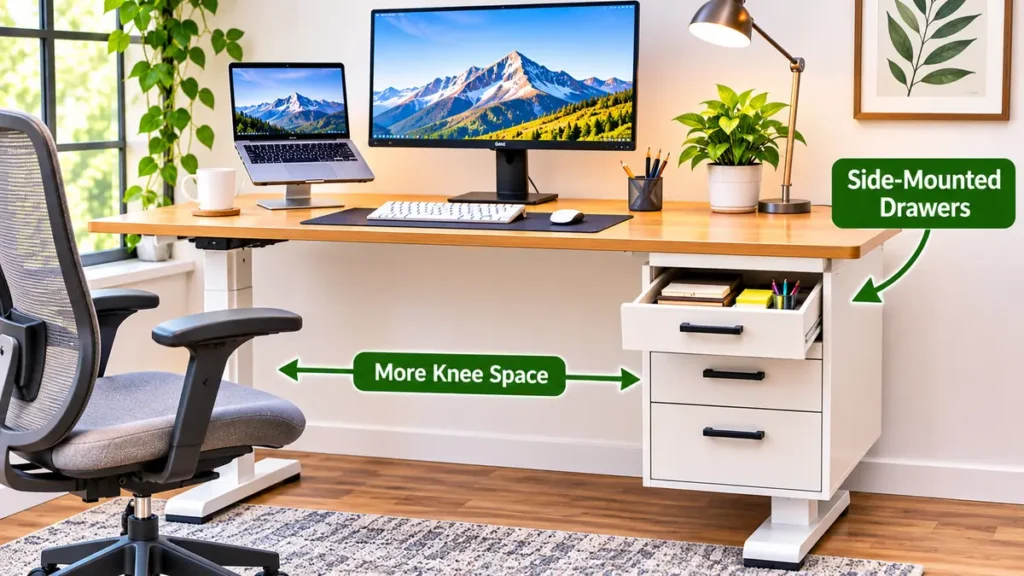
Drawer location can make a surprising difference to everyday comfort.
A single central drawer may look attractive, but it occupies space directly beneath the main working area.
Side-positioned storage may leave more central knee room, depending on the desk design.
Some configurations include drawers on one side of the desktop.
Others use a wide, shallow compartment stretching across much of the desk.
There isn’t one arrangement that works best for everyone.
Think about where you normally sit, how you position your keyboard, and which hand you use to access office supplies.
Check whether the drawer can open fully without contacting your chair, armrests, or nearby furniture.
A drawer that constantly collides with something becomes inconvenient regardless of how much storage it provides.
The best standing desk with drawers should allow easy access to supplies without obstructing your working position.
9. Consider Cable Management
Storage may reduce clutter on the desktop, but cables still need attention.
An electric standing desk commonly has connections for its lifting mechanism, monitor, computer, charging accessories, and other equipment.
Adding drawers can reduce the space available for cable-management products.
Before choosing a desk, check whether it includes approved cable-routing features or supports compatible accessories.
Cables need appropriate clearance from moving components.
They should not be pinched by drawer slides, lifting columns, or desk frames.
Power connections must also accommodate the desk’s intended movement without placing strain on plugs or cords.
A well-organized standing desk with drawers should provide convenient storage while keeping cable routing safe and accessible.
For additional ideas, see our guide to under-desk cable management.
Keeping cables organized is especially important when your desk changes height. Our guide to under desk cable management explains practical options for cable trays, sleeves, and cord routing.
10. Compare Materials and Maintenance
Desktop and drawer materials influence appearance, durability, cleaning, and everyday use.
Common options include engineered wood surfaces, laminate finishes, metal drawer components, and different frame materials.
Consider how the desk will be used.
A surface that is easy to wipe clean may be practical for a busy home office.
A durable drawer mechanism can be helpful when storage compartments are opened frequently.
Look at the quality of handles, drawer slides, and mounting components.
The drawer should move smoothly without excessive force or wobbling.
Also consider the manufacturer’s maintenance instructions.
A finish that looks attractive in product photographs may require more care than you expect.
Choose materials that match your workspace conditions and maintenance preferences.
11. Check the Warranty and Return Policy
A standing desk is a purchase you’ll probably expect to use for several years.
That makes warranty coverage and after-sales support worth checking carefully.
Review which components are covered.
The desktop, motor, electronic controls, frame, and drawer mechanisms may have different warranty conditions.
Look for information about replacement parts and customer support.
If buying online, check the retailer’s return policy.
Standing desks can be large and heavy, so returning an unsuitable model may involve additional arrangements or costs.
Confirm the assembled dimensions before ordering.
Also check whether the product requires professional assembly or whether the manufacturer provides clear instructions.
A good return policy can be particularly useful when buying furniture that you cannot examine in person.
Types of Standing Desks With Drawers
Different storage configurations suit different home offices.
| Desk Type | Main Advantage | Main Limitation | Best For |
|---|---|---|---|
| Single shallow drawer | Compact built-in storage | Limited capacity | Minimalist workspaces |
| Multiple integrated drawers | More storage compartments | May reduce legroom | Users with many small supplies |
| Side-mounted storage | May preserve central knee space | Can add width or uneven weight | Larger workstations |
| Compatible add-on drawer | Storage can be added later | Requires compatibility checks | Existing standing desk owners |
| Desk with mobile cabinet | Separate, flexible storage | Occupies floor space | Home offices needing larger storage |
The terms used by manufacturers may vary. Always review the actual storage configuration before purchasing.
Built-In Drawers vs. a Separate Filing Cabinet
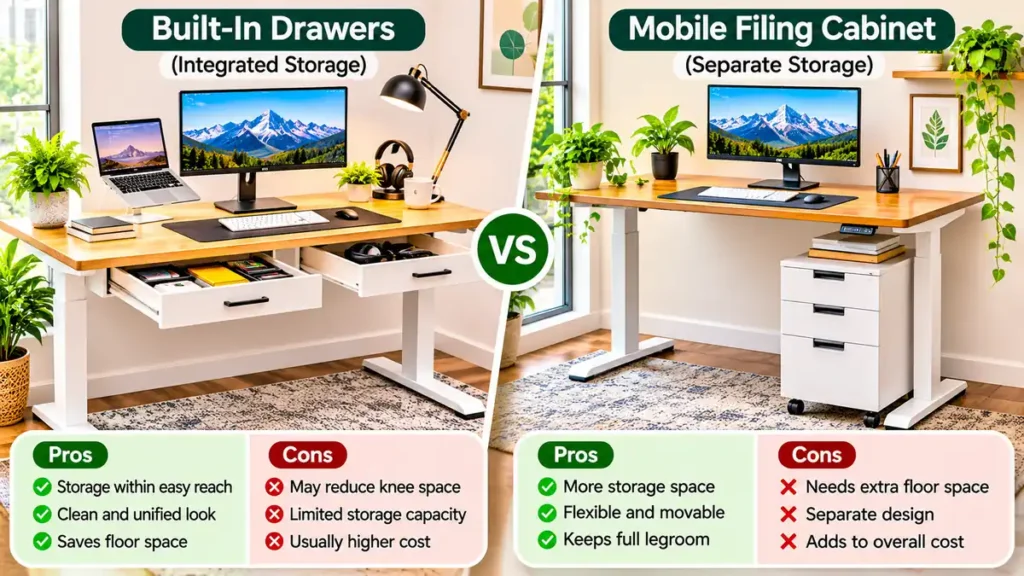
Should you buy a standing desk with integrated drawers or pair a simpler desk with a separate storage cabinet?
Both arrangements can work.
Built-In Drawers
Built-in drawers are convenient for keeping small items close.
They can create a clean appearance because the storage is visually connected to the desk.
When integrated into the moving desktop assembly, the drawers typically rise and lower with the work surface.
However, their capacity may be limited.
They can also reduce under-desk clearance.
Separate Filing Cabinet
A separate cabinet provides storage without necessarily adding weight to the adjustable desktop.
It may be easier to replace or reposition when your office layout changes.
A mobile pedestal can be particularly useful for home offices where storage needs vary.
However, the cabinet requires additional floor space.
If positioned beneath the desk, it must not obstruct the desk’s movement or your legs.
Which Is Better?
Choose integrated drawers when you mainly need compact storage for everyday essentials.
Consider a separate cabinet when you need larger storage capacity or prefer to keep the height-adjustable desktop as unobstructed as possible.
Neither option is universally better.
Electric vs Manual Standing Desks With Storage
Height-adjustable desks are available with different lifting mechanisms.
Electric models use powered controls to raise and lower the desktop.
Manual models generally require physical adjustment through a crank or another mechanical system.
Electric Standing Desks
Electric models may be convenient when you change working height frequently.
Some have programmable height presets.
But they also require an appropriate electrical connection and may contain more electronic components.
Manual Standing Desks
Manual models don’t generally need electricity for height adjustment.
However, changing the height may take more effort and time.
Drawer-equipped manual models may also have limitations depending on their design.
When comparing the two, consider how often you expect to change height, the desk’s rated capacity, and the manufacturer’s instructions.
A standing desk with drawers should remain easy to operate when loaded within its approved capacity.
Best Standing Desk With Drawers for Small Home Offices
A small home office benefits from furniture that performs more than one useful function.
A compact standing desk with drawers can combine a working surface and light storage without requiring a large traditional office desk.
However, the dimensions matter.
Measure the space where you plan to position the desk.
Account for base width, desktop overhang, chair movement, and nearby furniture.
Don’t choose a desk simply because it looks small in product photographs.
Check the published width, depth, and full height range.
For a narrow workspace, a single shallow drawer may be more practical than multiple deep compartments.
You should still have enough room for a comfortable keyboard position and appropriate monitor placement.
If your room is very small, a standing desk paired with compact freestanding storage may offer better flexibility.
What Should You Store in Standing Desk Drawers?
The most useful drawer contents are items you need regularly but don’t need to keep on the desktop.
Examples include:
- Pens and pencils
- Sticky notes
- Small notebooks
- USB accessories
- Spare charging cables
- Memory cards
- Paper clips
- Small office supplies
- Frequently used stationery
Use drawer dividers when needed to separate items.
Keep heavier objects in suitable storage locations that comply with the desk’s weight limits.
Avoid overcrowding drawers.
A well-organized drawer should make items easier to find rather than becoming a place to hide clutter.
Common Mistakes When Buying a Standing Desk With Drawers
Ignoring the Drawer Depth
A desk may look spacious until the drawer reduces your knee clearance.
Measure the space beneath the actual drawer assembly.
Buying More Storage Than Necessary
Additional drawers can increase cost and reduce flexibility.
Start with your real storage requirements.
Forgetting the Total Weight
Remember to include stored items and mounted accessories when evaluating the desk’s rated capacity.
Assuming Every Desk Supports Add-On Drawers
Desk frames, desktop materials, and mounting requirements vary.
Confirm compatibility before buying an accessory.
Overlooking Desk Movement
Drawers, cabinets, and cables must remain clear of lifting components.
Choosing a Desk That Doesn’t Fit Your Height
A desk with attractive storage is not useful if you can’t position the keyboard comfortably.
Ignoring Assembly Requirements
Check the product’s dimensions, assembly instructions, warranty, and return conditions before ordering.
Standing Desk With Drawers: Buying Checklist
Before purchasing, review these questions:
- Does the desk’s height range fit my seated and standing positions?
- Is there enough clearance beneath the drawers for my legs?
- Will my monitors, keyboard, and other accessories fit comfortably?
- Does the desk support the weight of my complete setup?
- Are the drawers large enough for the items I plan to store?
- Can the drawers open without hitting my chair?
- Is cable routing compatible with the lifting mechanism?
- Are the frame and drawer components stable?
- Are warranty terms and replacement parts clearly explained?
- Does the assembled desk fit my room?
- Is the return policy suitable for a large furniture purchase?
Use this checklist to compare models based on function rather than appearance alone.
If you’re considering adding a sliding keyboard platform, read our under desk keyboard tray guide to compare mounting options, ergonomic adjustments, and desk compatibility.
Frequently Asked Questions
Is a standing desk with drawers a good idea?
Yes, it can be useful for keeping everyday office supplies organized. The main considerations are drawer size, knee clearance, desk stability, and compatibility with your equipment.
Can a standing desk have built-in drawers?
Yes. Some height-adjustable desks include integrated drawers designed to move with the desktop. Other models support compatible add-on drawer accessories.
Do drawers make a standing desk less stable?
Drawers add weight and may change load distribution. Whether this affects stability depends on the desk’s frame design, load capacity, storage arrangement, and assembly.
Can I add drawers to my existing standing desk?
Possibly. Some desks support compatible drawer accessories, but you should check the manufacturer’s mounting instructions, approved accessories, and load limits first.
Are standing desks with drawers suitable for small rooms?
They can be. A compact model with one shallow drawer may reduce the need for extra storage furniture. However, you still need sufficient space for the chair, desk movement, and leg clearance.
Is a standing desk with drawers better than a desk without drawers?
Neither option is automatically better. Drawers provide convenient storage, while a desk without drawers may offer more under-desk clearance and flexibility.
Can I put a filing cabinet under a standing desk?
Sometimes, but the cabinet must not obstruct the desk’s movement or your legs. Check clearance at the desk’s lowest intended position and consider placing a mobile cabinet beside the desk instead.
Do standing desks with drawers cost more?
They may cost more than similar desks without storage, but the difference depends on the manufacturer, materials, motor system, and included features.
What is the best drawer arrangement for a standing desk?
A shallow drawer can work well for small accessories. Side-mounted storage or a separate cabinet may be preferable when preserving central legroom is especially important.
Can I use a keyboard tray with a standing desk that has drawers?
It depends on the desk’s mounting area and the existing drawer design. The keyboard tray must not interfere with storage compartments, structural components, or legroom.
Final Thoughts
A standing desk with drawers can be a practical choice for anyone who wants an organized home office without giving up the flexibility of an adjustable workstation.
The key is choosing storage that fits your equipment, desk dimensions, and daily working habits.
Don’t focus only on the number of drawers.
Check the actual storage capacity, height-adjustment range, knee clearance, frame stability, and manufacturer compatibility requirements.
For a compact workspace, one well-positioned drawer may be sufficient.
For a larger office, a separate cabinet or compatible storage system may offer more flexibility.
Choose a standing desk with drawers that makes your workspace easier to use while keeping comfort, movement, and accessibility in mind.
Sources and Further Reading
- OSHA: Computer Workstations, Desks
- OSHA: Workstation Purchasing Guide
- OSHA: Good Working Positions
- OSHA: Work Space and Clearance
Editorial note: This guide provides general buying advice based on workstation principles and published product information. It does not claim hands-on testing or rank particular desk models.