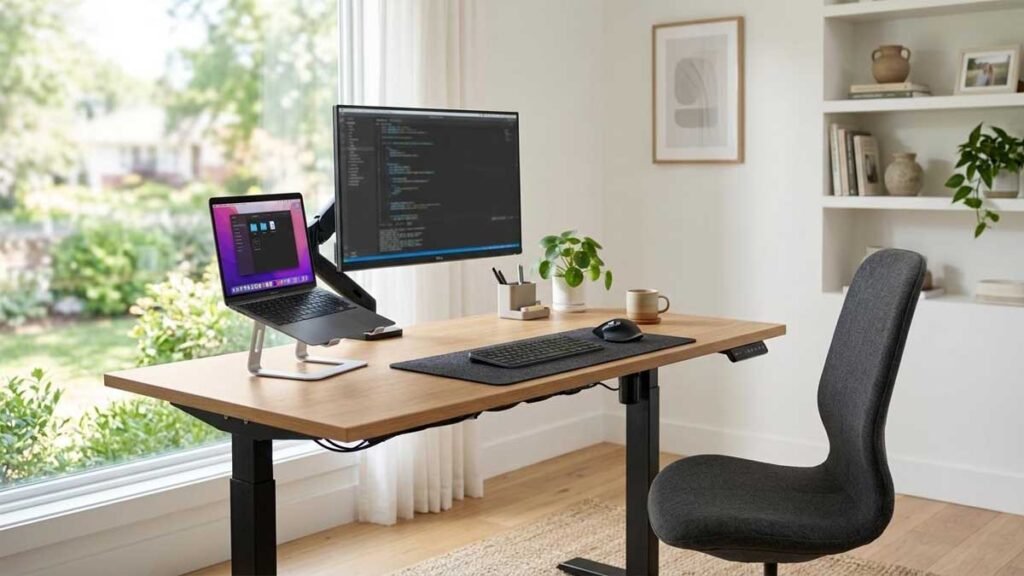
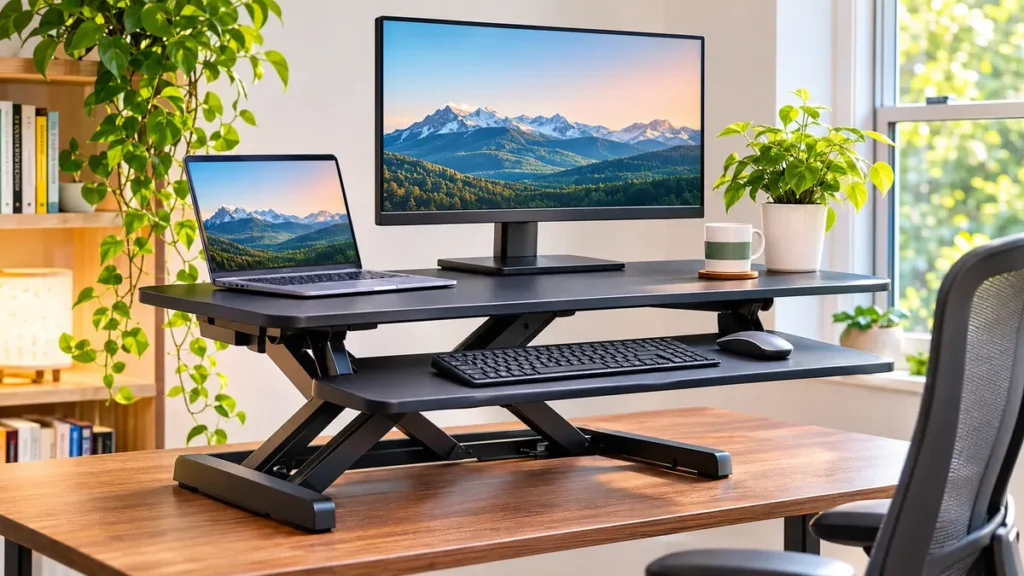
On This Page
You want the flexibility to stand while working, but replacing your entire desk might seem unnecessary. Perhaps your current desk is in good condition, your home office is small, or you simply want a more affordable way to change your working position.
That’s where a desk riser can help.
What is a riser desk? A riser desk, commonly called a desk riser or standing desk converter, is a platform placed on an existing desk to raise your computer equipment to a more suitable working height. Adjustable models allow you to switch between sitting and standing without replacing the desk underneath.
It’s a straightforward idea. Yet choosing the right riser requires more thought than finding a platform that looks attractive.
Some models lift both your monitor and keyboard. Others raise only the screen. Certain designs need substantial desk space, while compact options work better in smaller rooms.
In this guide, you’ll learn what a riser desk is, how it works, its benefits and limitations, the different types available, and what to consider before buying one.
We’ll also compare desk risers with full standing desks and explain how to set up a comfortable workstation.
If you’re wondering what is a riser desk and whether it can improve your workspace, the answer depends on your existing desk, computer equipment, and preferred working positions.
What Is a Riser Desk?
A riser desk is an elevated platform or adjustable desktop accessory that sits on top of an existing desk.
Its purpose is to change the working height of equipment such as a computer monitor, laptop, keyboard, or mouse.
The term is sometimes used broadly. In product descriptions, you may encounter three related names:
- Desk riser: A general term for a platform that raises equipment above the desktop.
- Standing desk converter: An adjustable desk riser designed to support working while sitting or standing.
- Monitor riser: A smaller, often fixed-height stand primarily intended to elevate a computer monitor.
These products are related, but they don’t always perform the same function.
A basic monitor riser may improve screen positioning without providing a suitable surface for standing-height typing.
A standing desk converter typically offers a larger work surface and may include a separate keyboard platform.
If you’re researching what a riser desk is because you want to alternate between sitting and standing, focus on adjustable standing desk converters rather than ordinary monitor stands.
How Does a Riser Desk Work?
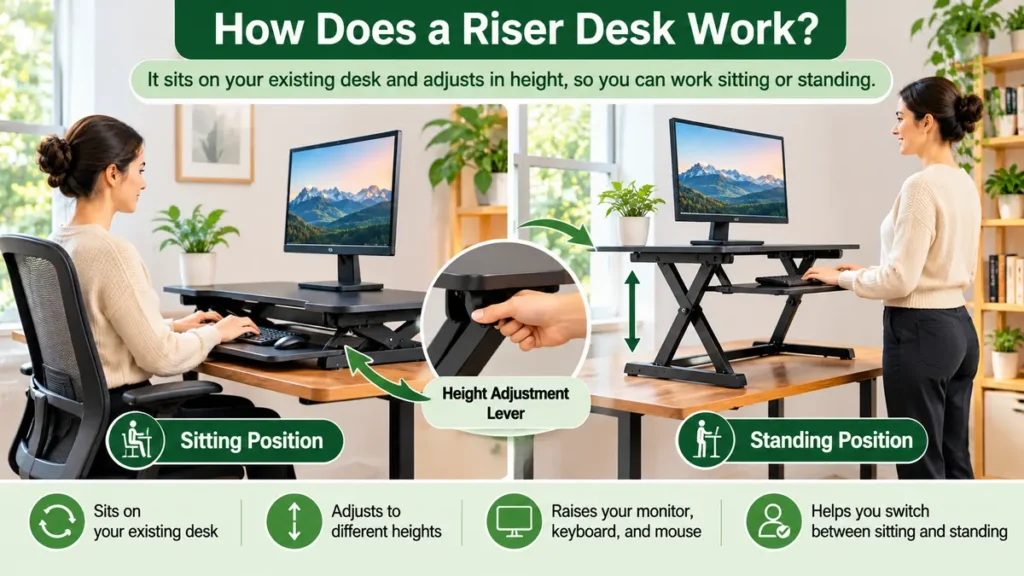
Most adjustable desk risers use a mechanical lifting system.
The unit rests on your existing desk, and its upper platform moves vertically to a selected height.
Depending on the design, height adjustment may be controlled through a lever, gas spring, spring-assisted mechanism, manual lift, or electric motor.
Some models use an X-shaped lifting frame.
Others have a vertical column or an alternative support system that moves the work surface up and down.
Many standing desk converters include two levels:
Upper platform: Usually supports a monitor, laptop, or other display equipment.
Lower platform: Provides space for a keyboard and mouse.
This arrangement helps accommodate the different positioning requirements of a monitor and keyboard.
However, the exact design depends on the product.
Always review the manufacturer’s specifications, because two risers with similar appearances may have different dimensions, adjustment ranges, and weight capacities.
9 Smart Benefits of Using a Riser Desk
A suitable desk riser offers several practical advantages, particularly when you already own a desk.
1. Converts an Existing Desk Into a Flexible Workstation
One of the biggest advantages of a desk riser is that it works with furniture you already own.
You don’t have to replace the entire desk to gain some height-adjustment capability.
Place a compatible adjustable converter on the desktop and position your equipment according to its instructions.
This arrangement may suit a home office where the existing desk is sturdy, attractive, and large enough to accommodate the converter.
It can also be useful in shared workplaces where replacing furniture isn’t practical.
The main requirement is compatibility.
Your current desk must support the riser’s dimensions and the combined weight of the unit and your equipment.
2. Makes Switching Between Sitting and Standing Easier
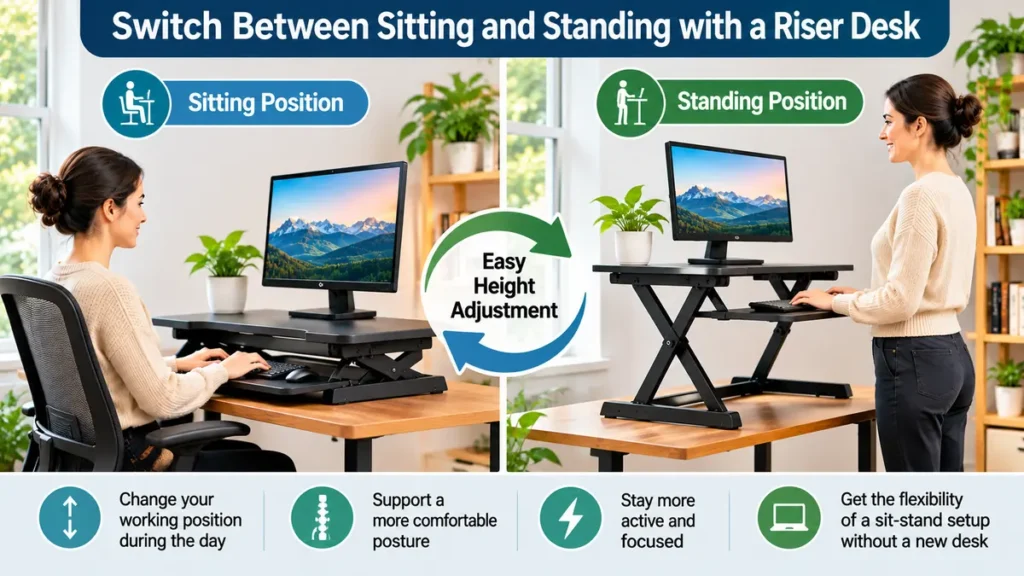
A standing desk converter can allow you to change working positions during the day.
When you prefer to sit, lower the platform to a suitable height.
When you want to stand, raise it to a height that supports comfortable keyboard and screen positioning.
This flexibility can help you avoid staying in one position for an extended period.
However, using a riser doesn’t mean you should stand continuously.
A comfortable workstation involves movement, posture changes, and suitable rest periods.
The goal is to make changing positions convenient, not to remain standing for as long as possible.
3. May Cost Less Than Replacing Your Desk
For some buyers, a desk riser is a practical alternative to purchasing an entirely new height-adjustable desk.
You retain the original furniture and purchase only the equipment needed to create a raised working surface.
This can reduce the amount of furniture you need to replace.
However, a riser desk isn’t automatically the cheapest option.
Premium converters with electric adjustment or large work surfaces may cost as much as some entry-level standing desks.
Compare the total purchase cost, useful features, warranty, and compatibility before making a decision.
Also consider whether you might eventually want a full standing desk.
Buying two separate products over time can be less economical than choosing the right workstation at the beginning.
4. Works With Many Home Office Layouts
A desk riser can be useful in apartments, bedrooms, study rooms, and compact home offices.
Because it sits on an existing work surface, it doesn’t necessarily require additional floor space.
This is especially helpful when the room already contains a desk, chair, shelves, or storage furniture.
Compact converters may be suitable for a laptop and external keyboard.
Wider models can accommodate a monitor and additional accessories.
But don’t assume every desk riser saves desktop space.
Some have large bases that occupy a substantial portion of the original desk.
Measure both the riser’s footprint and its usable working surface before buying.
5. Offers Adjustable Screen Positioning
Correct monitor placement can make computer work more comfortable.
An adjustable riser may help you change your monitor’s vertical position when moving between sitting and standing.
The screen should generally be directly in front of you, with its top around or slightly below eye level.
This helps you avoid repeatedly tilting your head upward to see the display.
However, raising the entire platform doesn’t automatically create the ideal monitor position.
Your monitor’s height, stand, screen size, and viewing distance still matter.
Some users may benefit from a compatible monitor arm or additional screen adjustment.
Choose a riser that allows you to position the display comfortably without sacrificing keyboard placement.
6. Can Support a More Organized Desktop
Some standing desk converters provide a dedicated surface for computer equipment.
A separate keyboard platform may keep the keyboard and mouse together while leaving other areas of the original desk available for paperwork.
Certain riser designs also have room beneath the raised platform for small accessories.
This may make a workstation feel more organized.
However, storage space varies widely.
A large converter can also make your existing desktop feel crowded.
Before buying, consider where your notebook, charging accessories, phone, and other frequently used items will go.
The right desk riser should support your workflow rather than create new obstacles.
7. Often Requires Limited Assembly
Many desktop converters are designed to be placed on an existing desk with relatively little setup.
Some models arrive largely assembled.
Others require attaching a keyboard tray, handles, monitor mounts, or other components.
Compared with replacing a full desk, installation may be simpler.
Still, you should read the manufacturer’s assembly instructions carefully.
Incorrect assembly can affect stability or operation.
Also check the product’s actual weight before purchasing.
A heavy converter may require assistance to position safely, even if it doesn’t involve complicated assembly.
8. Provides Flexibility for Renters and Temporary Offices
If you rent your home or expect to rearrange your workspace, a desktop riser can offer useful flexibility.
Many models don’t require permanent alterations to your desk or room.
You may be able to move the riser to another compatible desk when your living or working arrangement changes.
This can be helpful for students, remote workers, and people using a temporary office.
However, portability depends on the design.
Some converters are substantial pieces of equipment rather than accessories intended for frequent transport.
Check the weight, dimensions, and setup requirements if moving the riser is important to you.
9. Lets You Test a Sit-Stand Working Routine
A desk riser may be a practical starting point if you’re curious about height-adjustable workstations.
You can explore how different working positions fit your tasks without immediately replacing the existing desk.
For example, you might prefer standing during short reading sessions, video meetings, or selected computer tasks.
You may prefer sitting for other activities.
The experience can help you understand which features matter most to you.
Perhaps you need a wider keyboard tray, a larger work surface, or more height adjustment.
These observations can guide future workstation decisions.
A desk riser is useful when it fits your actual working habits, rather than an expectation that everyone should stand throughout the workday.
What Are the Disadvantages of a Riser Desk?
Understanding what a riser desk is also means recognizing its limitations.
It Occupies Desktop Space
A converter sits on top of your existing furniture.
Its base, frame, and moving platform can reduce the usable area of the original desktop.
This may become frustrating if you frequently work with documents or need a large writing surface.
Some Models Have Limited Adjustment
Not every riser lowers enough for comfortable seated typing or rises sufficiently for taller users.
A model with only a few fixed height positions may be less flexible than one with a broad adjustment range.
Keyboard Placement Can Be Difficult
The monitor and keyboard require different heights.
A converter without a well-designed keyboard platform may place your hands too high when seated or standing.
That can lead to uncomfortable wrist and shoulder positions.
Stability Varies
Some desk risers move slightly when typing, especially at higher positions.
The amount of movement depends on the frame design, load, work surface, and assembly.
Read specifications and independent user feedback before buying.
A Full Standing Desk May Offer More Space
An adjustable standing desk raises its entire desktop.
This can be more convenient when you use multiple monitors, large notebooks, or numerous accessories.
A desktop converter may feel restrictive in comparison.
Types of Desk Risers Explained
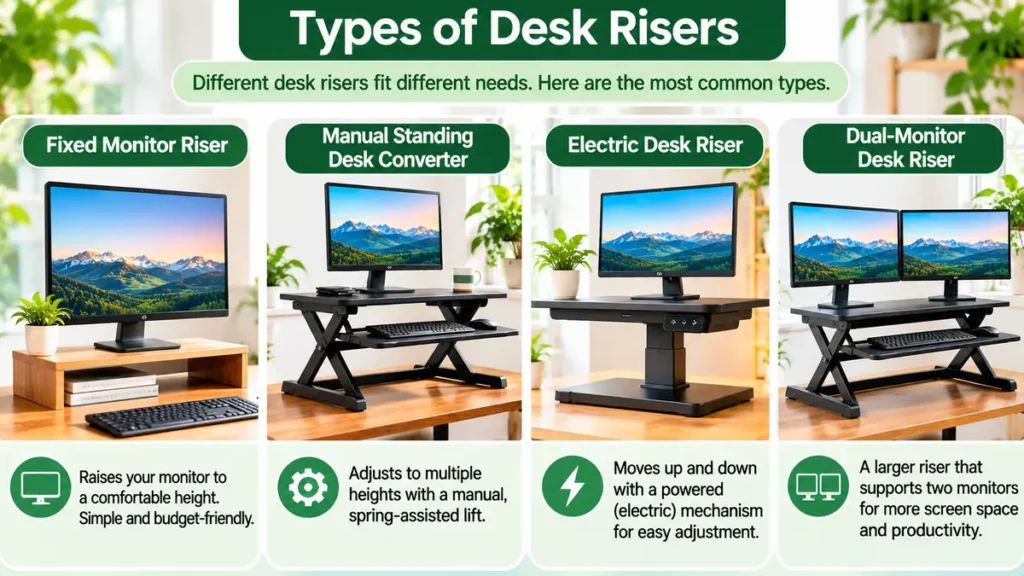
There are several types of desk risers available, and they serve different needs.
Fixed Monitor Risers
A fixed monitor riser is usually a small stand placed beneath a monitor.
It raises the screen above the main desktop.
Some include small shelves or storage space.
This type is suitable when you only need to adjust monitor height.
However, a fixed monitor riser doesn’t turn an ordinary desk into a height-adjustable workstation.
It isn’t a complete substitute for a standing desk converter.
Manual Standing Desk Converters
Manual converters require the user to change the platform height through a mechanical adjustment.
Some use spring-assisted or gas-spring mechanisms to make lifting easier.
These models can provide multiple height settings without requiring an electrical connection.
The adjustment method and effort required vary.
If you plan to change positions frequently, choose a mechanism that you can operate comfortably.
Electric Desk Risers
Electric desk risers use a powered lifting mechanism.
They may be useful when easy height adjustment is a priority.
Some offer electronic controls or preset heights.
However, electric designs require a suitable power source and may cost more than comparable manual models.
Check the available adjustment range, lifting capacity, operating controls, and warranty.
Compact Laptop Risers
Compact risers may support a laptop or small workstation.
Some have adjustable platforms, while others are simple fixed stands.
They can be convenient when space is limited.
But a raised laptop screen may place the built-in keyboard too high for comfortable typing.
For longer computer sessions, a separate keyboard and mouse may be more suitable.
Dual-Monitor Standing Desk Converters
A dual-monitor converter provides a larger work surface or compatible mounting arrangement for two displays.
It can be useful for people who use multiple applications simultaneously.
However, monitor weight and dimensions must remain within the riser’s rated limits.
Consider screen placement, viewing distance, cable routing, and platform stability before choosing this type.
Riser Desk vs Standing Desk: What’s the Difference?
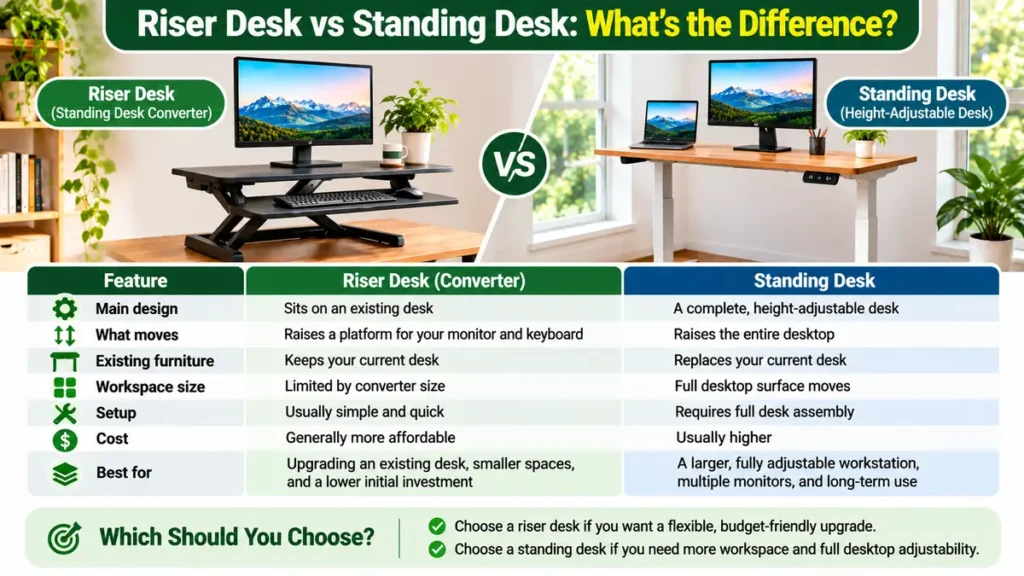
A desk riser and a full standing desk can both support height-adjustable working positions, but they achieve that in different ways.
A riser desk raises selected equipment above an existing desk.
A standing desk raises the main desktop itself.
| Feature | Riser Desk / Standing Desk Converter | Full Standing Desk |
|---|---|---|
| Main design | Sits on an existing desk | Complete desk |
| Height adjustment | Raises a smaller platform | Raises the entire desktop |
| Existing furniture | Usually retained | Existing desk may be replaced |
| Available surface | Limited by converter size | Full desktop moves |
| Keyboard placement | Depends on tray design | Depends on desktop height and accessories |
| Installation | Often relatively simple | May require full furniture assembly |
| Storage compatibility | Limited by converter footprint | Depends on frame and desktop design |
| Best suited for | Upgrading an existing desk | Creating a complete adjustable workstation |
When researching what is a riser desk, one common question is whether a desktop converter offers the same flexibility as a complete height-adjustable standing desk.
Which One Should You Choose?
Choose a desk riser when:
- Your current desk is sturdy and appropriately sized.
- You want adjustable working height without replacing furniture.
- Your computer equipment fits the converter.
- You prefer a smaller initial furniture change.
Consider a full standing desk when:
- You need a larger adjustable work surface.
- You use multiple monitors or many accessories.
- You want the entire desktop to move together.
- You’re furnishing a new workspace.
Neither option is automatically better.
The right choice depends on your available space, equipment, budget, and working habits.
For a more detailed explanation of complete height-adjustable desks, read our guide on what is a standing desk.
How to Set Up a Riser Desk Ergonomically

Buying a suitable riser is only the first step.
The way you position your computer and accessories has a major influence on comfort.
Position the Monitor Correctly
Place the monitor directly in front of your normal working position.
The top of the screen should generally be at or slightly below eye level.
You should be able to view the display without repeatedly bending your neck forward or tilting your head backward.
Viewing distance matters too.
OSHA’s workstation purchasing guidance recommends sufficient desktop depth to position the monitor at least 20 inches from your eyes.
The most comfortable arrangement depends on screen size, vision needs, and the work being performed.
Keep Your Keyboard Near Elbow Height
Your keyboard should generally sit close to your relaxed elbow height.
Keep your shoulders comfortable and your elbows near your body.
Your wrists should remain relatively straight while typing.
If the converter’s keyboard tray sits too high, lowering the monitor alone won’t solve the problem.
Choose a design that supports both screen and keyboard positioning.
For additional keyboard placement options, see our guide to under desk keyboard trays.
Make Room for Your Mouse
A narrow keyboard platform may leave too little space for a mouse.
This can force you to reach outward repeatedly.
Look for enough surface area to keep the mouse near the keyboard.
Test the arrangement with the keyboard and mouse you actually use.
Maintain a Comfortable Seated Position
When sitting, adjust your chair so your feet are supported and your back is comfortable.
The converter should lower sufficiently to keep your keyboard at a suitable height.
If the raised base makes seated typing uncomfortable, the riser may not be compatible with your desk height.
Our standard desk height guide explains the measurements that matter when planning a workstation.
Change Positions Regularly
Standing all day isn’t the goal.
Alternate between comfortable positions and make time for normal movement.
OSHA recommends changing working positions periodically rather than remaining in the same posture for prolonged periods.
A riser makes adjustment possible, but you still need to use that flexibility.
9 Smart Buying Tips for Choosing a Riser Desk
Before buying, compare more than appearance and advertised features.
1. Measure Your Existing Desk
Start with your desk’s width and depth.
Compare those measurements with the converter’s base dimensions.
Make sure the riser sits securely without overhanging unsupported edges.
Also consider the equipment and supplies you want to keep on the original desktop.
2. Check the Maximum and Minimum Height
A riser should fit both your preferred sitting and standing positions.
Look for a published height-adjustment range.
Pay special attention to the lowest keyboard position.
Some converters raise the keyboard even when fully lowered, which may make seated typing uncomfortable.
3. Confirm the Weight Capacity
Check the manufacturer’s rated load capacity.
Include the weight of monitors, laptops, keyboard accessories, and any additional supported equipment.
For multiple monitors, confirm whether the riser has specific monitor-size or mounting restrictions.
Never exceed the published limits.
4. Examine the Keyboard Tray
A separate keyboard tray can be valuable when the monitor and keyboard need different heights.
Check its dimensions and usable mouse space.
Also consider whether the platform has comfortable edges and enough clearance for normal movement.
A tray that’s too narrow can make an otherwise attractive converter inconvenient.
5. Evaluate the Lifting Mechanism
Consider how the platform moves.
A smooth lifting mechanism may be more convenient if you expect to change positions repeatedly.
Some models require both hands to operate.
Others include handles or assisted lifting systems.
Compare the operating instructions rather than assuming all adjustment mechanisms behave the same way.
6. Look for Stable Construction
A converter should remain stable during normal computer use.
Consider frame design, base dimensions, materials, and manufacturer instructions.
Read feedback from buyers using similar monitor arrangements.
Also check whether the riser requires a minimum desktop thickness or surface condition.
7. Plan Your Cable Management
Computer cables must accommodate the riser’s movement.
Leave enough cable length for the full adjustment range.
Avoid routing cords where they could be stretched, pinched, or trapped by the lifting mechanism.
Keep power connections accessible and follow equipment instructions.
Our under desk cable management guide covers useful ways to organize workstation cables.
8. Compare Useful Features, Not Just Price
A less expensive riser may suit a simple laptop setup.
A wider converter with a better keyboard platform may be worth considering for a multi-monitor workstation.
Focus on the features you will actually use.
Extras that don’t improve your daily workflow may not justify paying more.
9. Review the Warranty and Return Policy
Check the warranty terms and return conditions before purchasing.
A desktop converter can be heavy and bulky, so returning an unsuitable product may be inconvenient.
Look for clear assembly instructions, replacement-part information, and customer support.
If possible, choose a retailer that provides complete dimensions and product specifications.
How to Choose the Right Riser Desk for Your Setup
Different home offices benefit from different designs.
| Your Setup | Features to Prioritize |
|---|---|
| Single laptop | Compact footprint, external keyboard compatibility |
| Laptop + monitor | Adequate platform depth and weight capacity |
| Single desktop monitor | Suitable monitor height and keyboard surface |
| Dual monitors | Wider platform, stability, higher rated capacity |
| Small home office | Compact base and minimal obstruction |
| Frequent sitting/standing changes | Convenient lifting mechanism |
| Shared desk | Broad adjustment range and easy controls |
These are selection guidelines rather than specific product recommendations.
Exact compatibility should always be confirmed against the manufacturer’s specifications.
Common Mistakes When Buying a Desk Riser
Confusing a Monitor Riser With a Standing Converter
A simple monitor stand may raise the screen but won’t necessarily provide a standing-height keyboard surface.
Check the product’s intended function.
Ignoring the Lowered Height
A riser that works comfortably while standing may be too high when lowered.
Test both positions before buying.
Choosing a Platform That’s Too Narrow
Your keyboard and mouse need enough space to remain close together.
A cramped platform may force uncomfortable reaching.
Forgetting Cable Movement
Cables can become stretched or trapped when an adjustable platform moves.
Plan routing before using the converter.
Assuming Standing Is Always Better Than Sitting
A riser should support movement and position changes.
Continuous standing isn’t necessary or automatically beneficial.
Overlooking Existing Desk Stability
A strong converter still depends on the desk supporting it.
Check the base furniture’s condition and capacity.
Buying Without Measuring
Product photographs don’t reliably show how much desk space a converter uses.
Measure the actual work area and compare it with the listed dimensions.
Is a Riser Desk Worth It?
For many people, a desk riser can be a practical way to add height adjustment to an existing workstation.
It may be particularly useful when you want to keep your current desk, work in a limited space, or explore a sit-stand routine.
However, the purchase makes sense only if the riser is compatible with your furniture and equipment.
If your desk is already too high for comfortable seated typing, adding a converter may make the problem worse.
If you need a large work surface that moves together, a full standing desk may be more suitable.
Think about how you actually work.
An adjustable desk riser is worth considering when it provides comfortable keyboard positioning, appropriate monitor height, sufficient working space, and easy operation.
Frequently Asked Questions
What is a riser desk used for?
A riser desk raises selected computer equipment above an existing desk. Adjustable models allow users to change working height for sitting and standing activities.
Is a riser desk the same as a standing desk?
No. A riser desk normally sits on an existing desktop, while a full standing desk raises and lowers its entire work surface.
What is another name for a riser desk?
Common related terms include desk riser, standing desk converter, and desktop standing desk. The terminology varies by manufacturer.
Can I put a desk riser on any desk?
Not necessarily. The desk must be sturdy, large enough, and capable of supporting the converter and connected equipment.
Are desk risers good for laptops?
They can be, provided the platform supports the laptop securely. For longer typing sessions, an external keyboard and mouse may allow more comfortable positioning.
Do desk risers help with posture?
A properly adjusted riser may support more comfortable screen and keyboard positioning. However, it doesn’t guarantee better posture or prevent discomfort by itself.
How high should a desk riser be?
The appropriate height depends on the user and equipment. Position the keyboard near relaxed elbow height and the monitor so you can view it without excessive neck bending.
Can a desk riser hold two monitors?
Some models support dual monitors, but capacity and platform dimensions vary. Check the manufacturer-approved monitor sizes, weights, and mounting arrangements.
Do desk risers need electricity?
Manual desk risers generally don’t require electricity. Electric converters need a suitable power connection.
Can I use a desk riser with a keyboard tray?
Some models include an integrated keyboard tray. Adding an external tray depends on the converter’s design and manufacturer’s approval.
Is a desk riser suitable for a small apartment?
A compact model may work well, but its footprint and raised-platform movement must fit the available desk space.
Is it better to buy a desk riser or a new standing desk?
Choose a riser if you want to retain a compatible existing desk. Consider a full standing desk if you need greater overall desktop adjustability and working space.
What is a riser desk for a home office?
A riser desk is a platform placed on an existing desktop to raise a monitor, laptop, or keyboard. Adjustable models can help you alternate between sitting and standing without replacing your desk.
Final Thoughts
Understanding what a riser desk is makes it easier to decide whether one belongs in your home office.
A desktop riser can add useful height adjustment without requiring a complete furniture replacement.
It may offer convenient switching between sitting and standing, flexible monitor positioning, and a practical way to upgrade an existing workstation.
Still, the best option depends on your equipment, available space, and preferred working positions.
Check the adjustment range, keyboard tray, stability, weight capacity, and compatibility before buying.
Most importantly, choose a setup that allows you to work comfortably and change positions throughout the day.
A good desk riser should fit your everyday routine, not force you to work around its limitations.
References and Further Reading
- OSHA: Good Working Positions
- OSHA: Computer Workstation Keyboards
- OSHA: Computer Workstation Monitors
- OSHA: Workstation Purchasing Guide
- OSHA: Workstation Evaluation Checklist
Editorial note: This article provides general workstation guidance. Product dimensions, lifting mechanisms, weight limits, and compatibility should be confirmed using the specifications of the particular desk riser being considered.