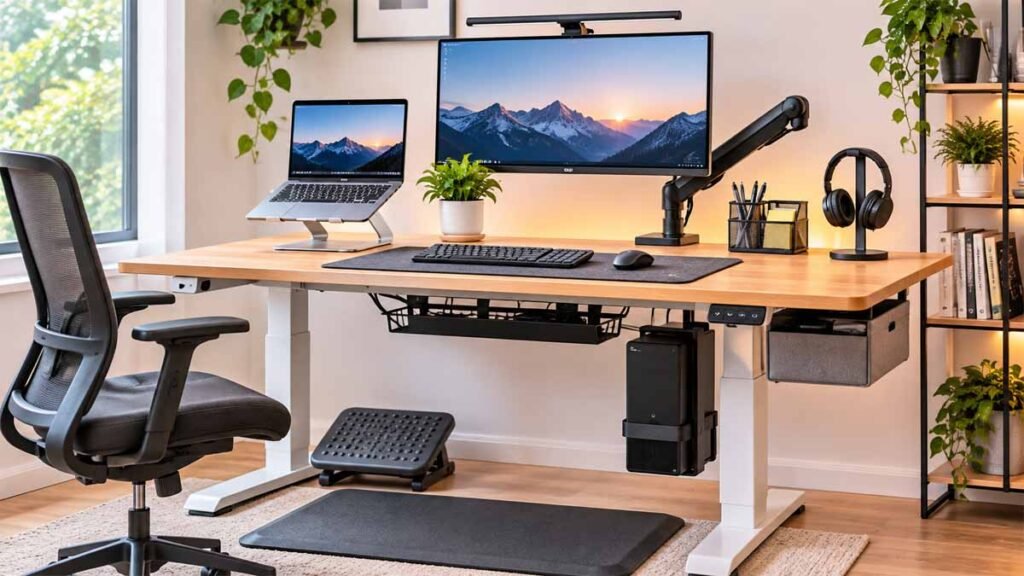
A height-adjustable desk can make your home office more flexible, but the desk alone doesn’t guarantee a comfortable or organized workspace. Your monitor may sit at the wrong height, cables can become tangled as the desktop moves, and everyday essentials might take up valuable working space.
That’s where standing desk accessories come in.
The right accessories can improve how you arrange your equipment, manage cords, and switch between seated and standing positions. But you don’t need to purchase every gadget advertised for modern office setups.
Some additions solve genuine problems. Others simply create clutter.
In this guide, we’ll examine 11 practical standing desk accessories, explain what each one does, and help you decide which options suit your equipment, budget, and available space.
Whether you’re building a home office from scratch or upgrading an existing workstation, the goal is simple: choose accessories that make your desk easier to use every day.
What Are Standing Desk Accessories?
Standing desk accessories are products designed to improve the comfort, organization, equipment placement, and everyday usability of a height-adjustable workstation.
They include monitor arms, cable management trays, keyboard platforms, desktop organizers, and computer mounting systems.
Unlike a regular fixed-height desk, an adjustable desk moves vertically. Anything attached to the desktop needs to accommodate that movement.
That makes compatibility particularly important.
A monitor arm should support your screen and fit the desktop. A cable tray needs to leave room for moving components. A computer holder must support the equipment without interfering with the desk frame.
Before purchasing accessories for standing desk setups, consider the problem you’re trying to solve.
If your monitor is too low, an adjustable monitor arm may help. If cords hang beneath the desk, cable management may be a better first investment.
Quick Comparison: 11 Standing Desk Accessories
| Accessory | Main Purpose | Priority |
|---|---|---|
| Monitor arm | Adjustable screen positioning | High for monitor users |
| Cable management tray | Organizes power and data cords | High |
| Anti-fatigue mat | Adds cushioning when standing | Optional |
| Keyboard tray | Adjusts keyboard position | Depends on desk height |
| Desk mat | Protects surface and defines working area | Optional |
| Under-desk drawer | Adds compact storage | Useful for small offices |
| Laptop stand | Raises a laptop screen | Useful with external keyboard |
| Monitor light bar | Illuminates desktop work | Optional |
| Headphone holder | Keeps headphones off the work surface | Optional |
| CPU holder | Mounts a desktop computer | Equipment-dependent |
| Adjustable footrest | Supports feet when seated | Depends on individual needs |
The priority depends on your workstation. Someone using a laptop will have different requirements from someone with two monitors and a desktop computer.
1. Adjustable Monitor Arm
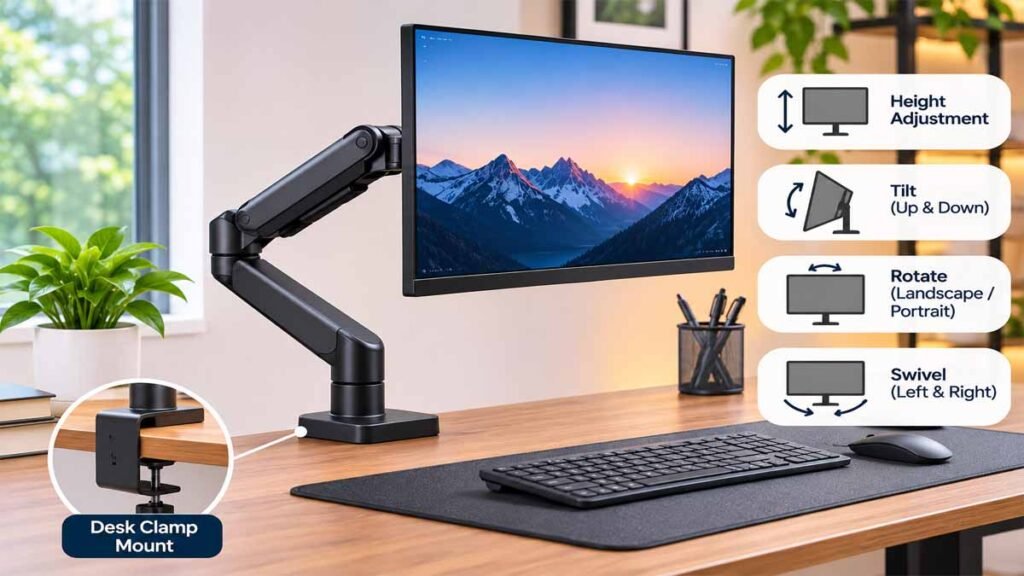
A monitor arm is one of the most useful standing desk accessories for people who work with an external display.
It supports your monitor above the desktop and allows you to adjust its position.
Depending on the design, you may be able to change the screen height, viewing angle, rotation, and distance.
This is helpful when switching between sitting and standing.
A monitor positioned too low may encourage you to bend your neck forward. A screen positioned too high can make you tilt your head backward.
OSHA recommends arranging the monitor directly in front of the user, with the top of the screen at or slightly below eye level for typical computer work.
What to Check Before Buying
- Supported monitor weight.
- Compatible screen size.
- VESA mounting compatibility.
- Clamp or grommet mounting method.
- Desktop thickness and material.
- Adjustment range.
- Available space behind the desk.
A monitor arm that doesn’t support your screen correctly can be unstable.
If you have two monitors, a dual-monitor arm may be practical, but separate adjustable arms may offer more positioning flexibility.
Buying tip: Measure your monitor and desk before comparing standing desk monitor arms. Screen size alone doesn’t determine compatibility.
2. Under-Desk Cable Management Tray

Moving desks require careful cable organization.
Without a proper system, power cords, monitor cables, USB connections, and charging wires can hang beneath the desktop.
An under-desk cable tray provides a designated location for organizing compatible cords and accessories.
Many trays attach beneath the work surface using screws or clamps.
Others use adhesive mounting systems, although suitability depends on the product and surface.
Good cable management can reduce visible clutter and make the space around your feet easier to keep clear.
Features Worth Considering
Look for a tray that provides enough room for your cables without interfering with the lifting mechanism.
Check whether the tray can be accessed easily when equipment changes.
A useful standing desk accessory should accommodate the desk’s full movement range.
Route cables according to the desk and electrical equipment manufacturers’ instructions. Keep cords away from pinch points and avoid overloading power accessories.
Buying tip: Before installing anything, raise and lower the empty desk through its normal operating range to understand where clearance is needed.
3. Anti-Fatigue Standing Mat
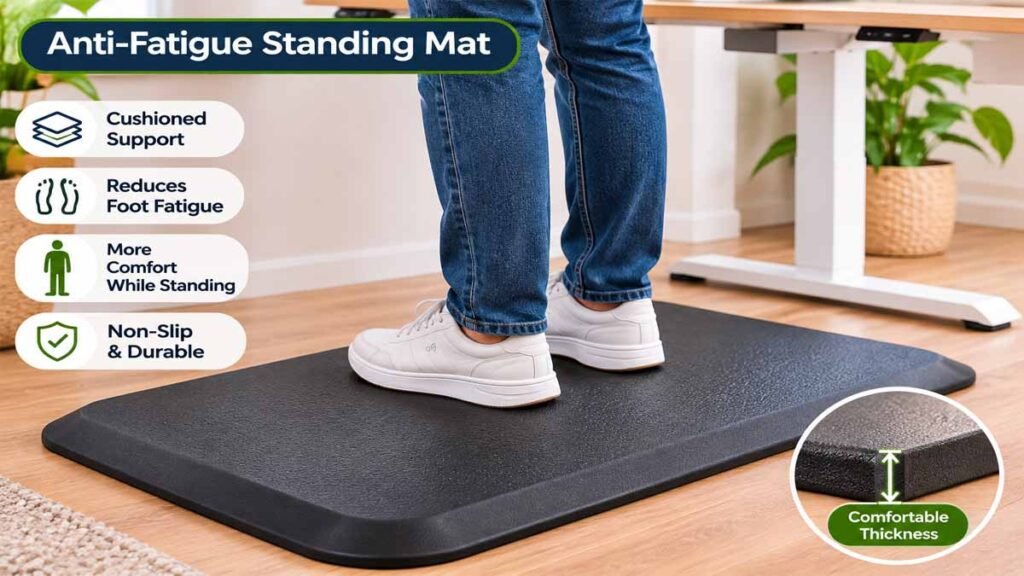
An anti-fatigue mat provides a cushioned surface beneath your feet.
Some users find these mats more comfortable than standing directly on hard flooring.
Different designs include flat cushioned mats and contoured mats with raised surfaces.
However, an anti-fatigue mat isn’t necessary for every person.
It also doesn’t make prolonged motionless standing ideal.
Changing positions and taking movement breaks remain important.
What Makes a Good Standing Mat?
Consider the mat’s thickness, stability, surface texture, and ease of cleaning.
A mat should remain stable during ordinary use and should not create a tripping hazard.
If you regularly move your office chair into the same area, choose a mat that’s easy to reposition or store.
Buying tip: Comfort is individual. Avoid buying an expensive mat simply because it appears on a list of best standing desk accessories.
4. Adjustable Keyboard Tray
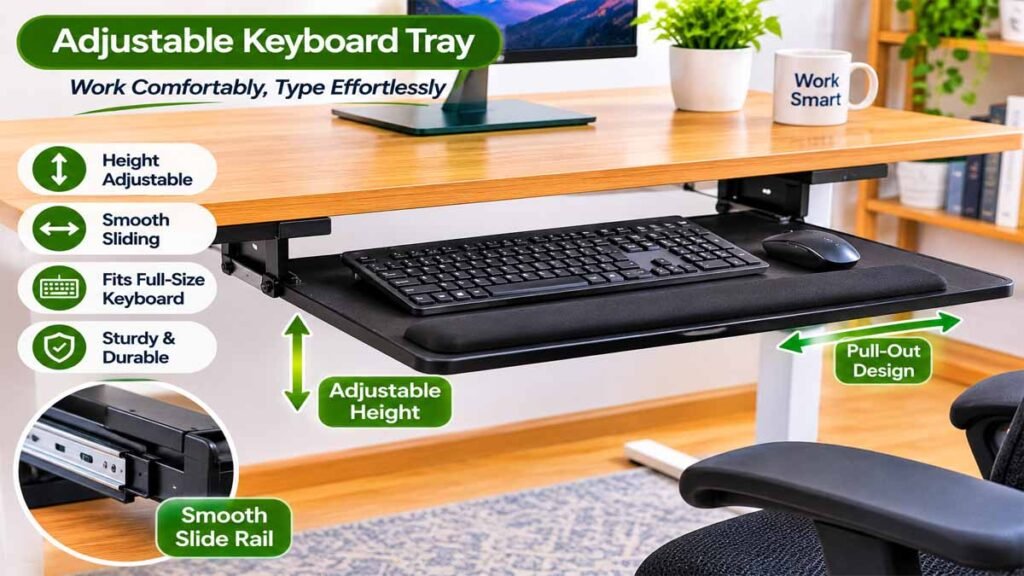
A keyboard tray can help when your desktop is too high for comfortable typing.
Some trays attach beneath the desk and allow you to lower the keyboard independently from the work surface.
Others offer adjustable tilt and positioning.
According to OSHA’s workstation guidance, the keyboard should generally be positioned so the shoulders remain relaxed, elbows stay close to the body, and wrists remain aligned with the forearms.
A suitable tray can help achieve this arrangement.
Important Compatibility Checks
Before purchasing, measure the underside of the desk.
Check whether the frame, support bars, cable trays, or drawers would interfere with installation.
The tray should also leave sufficient room for both your keyboard and mouse.
A narrow tray that forces the mouse into an awkward position may create a new problem rather than solving an existing one.
For some height-adjustable desks, a keyboard tray isn’t necessary because the entire work surface can already be positioned comfortably.
5. Large Desk Mat

A desk mat is a simple addition that can make a workstation look more organized.
It creates a defined area for your keyboard, mouse, and other frequently used items.
Depending on the material, a mat may also protect the desktop from everyday wear.
Popular materials include fabric, synthetic leather, cork, and rubber-backed surfaces.
Choose a material appropriate for your desk and cleaning preferences.
How to Choose the Right Size
Measure the combined width of your keyboard and mouse movement area.
A desk mat should leave enough space for comfortable mouse use without covering the entire desktop unnecessarily.
For compact standing desk workstations, an oversized mat may make the surface feel crowded.
Desk mats are mainly an organization and comfort preference, rather than a necessary ergonomic purchase.
6. Under-Desk Drawer

A small drawer can be useful when your desktop has limited storage.
It provides a place for notebooks, pens, charging accessories, and other small items.
Some under-desk drawers attach with screws. Other designs use clamps or adhesive systems.
Check the permitted load and installation method.
Why Desk Clearance Matters
Standing desks contain moving components beneath the work surface.
Before attaching a drawer, make sure it won’t collide with the desk frame, support structure, or your legs.
The drawer should remain accessible at the heights you use most frequently.
If you’re planning a minimalist home office, a compact drawer can help keep the desktop clear without requiring another piece of furniture.
7. Adjustable Laptop Stand

A laptop stand raises the computer screen above the work surface.
This can help with screen positioning, especially when you’re using a laptop as your primary computer.
However, raising the laptop also raises its built-in keyboard.
For longer computer sessions, a separate keyboard and mouse can make screen and typing positions easier to adjust independently.
What to Consider
Look for a stable stand that supports your laptop’s size and weight.
Check that it doesn’t block the laptop’s ventilation openings.
Consider whether you need a fixed stand, adjustable riser, or space-saving vertical holder for a closed laptop.
The most suitable design depends on how you use your computer.
A laptop stand is among the more useful standing workstation accessories when paired with a separate keyboard.
8. Monitor Light Bar

A monitor light bar is a compact lighting accessory positioned near the top of a computer screen.
It generally aims light toward the desktop rather than illuminating the entire room.
This can be convenient when reading documents, writing notes, or working in a dim environment.
Some models offer adjustable brightness and color temperature.
Do You Actually Need One?
Not necessarily.
If your room already has suitable lighting, a monitor light bar may provide little additional benefit.
It also shouldn’t create uncomfortable screen reflections or glare.
Before buying, check whether the light fits your monitor’s shape and mounting arrangement.
A conventional adjustable desk lamp may be more versatile for some workspaces.
9. Headphone Holder
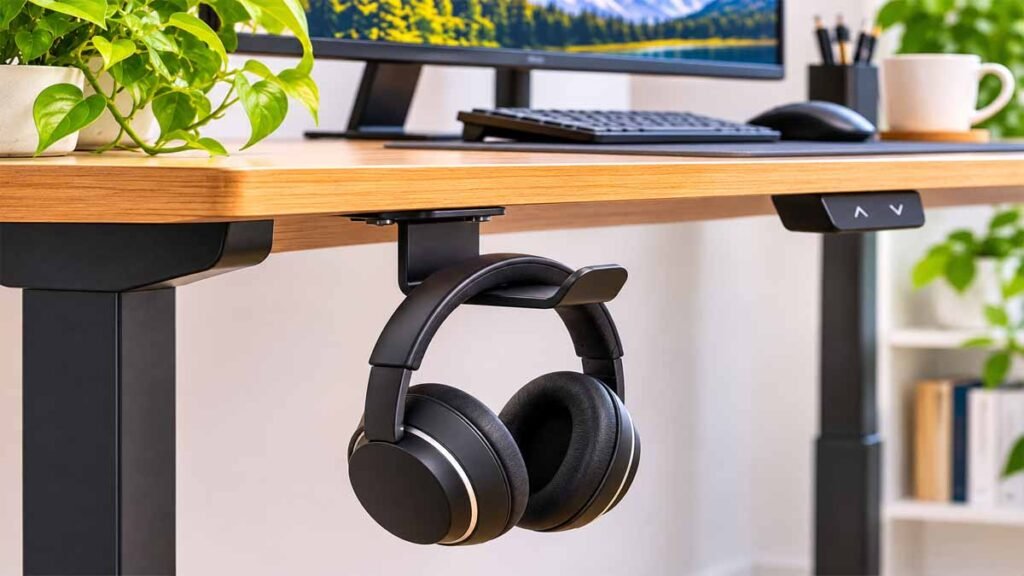
A headphone holder keeps headphones off the work surface when they’re not in use.
Common designs include desktop stands, clamp-on hooks, and under-desk mounts.
It’s a small accessory, but it can be convenient if you regularly use headphones for meetings or focused work.
Where Should You Install It?
Choose a location that’s easy to reach without interfering with desk movement.
A clamp-on holder may be preferable if you don’t want to drill into the desktop.
For desks with narrow edges or thick frames, check mounting compatibility carefully.
Among the smaller standing desk attachments, a headphone holder is relatively simple, but it isn’t essential for everyone.
10. Under-Desk CPU Holder
A CPU holder standing desk accessory is designed to support a compatible desktop computer tower or small computer beneath the work surface.
These products are sometimes called computer holders, PC mounts, or under-desk tower mounts.
They can free up desktop space and keep the computer moving with an adjustable workstation when properly designed and installed.
However, mounting a computer beneath a moving desk requires particular care.
What to Check Before Installation
- Computer dimensions and weight.
- Mounting system load rating.
- Available clearance beneath the desktop.
- Desk frame compatibility.
- Ventilation requirements.
- Cable movement and connection limits.
- Manufacturer instructions for mounting.
OSHA recommends maintaining adequate leg clearance beneath computer desks and avoiding unnecessary equipment that restricts movement.
A computer mount should never compromise that space.
If your desk or computer manufacturer doesn’t support the installation, consider a safer alternative location.
For people with large computer towers, a floor stand may sometimes be more practical than an under-desk mount.
11. Adjustable Footrest
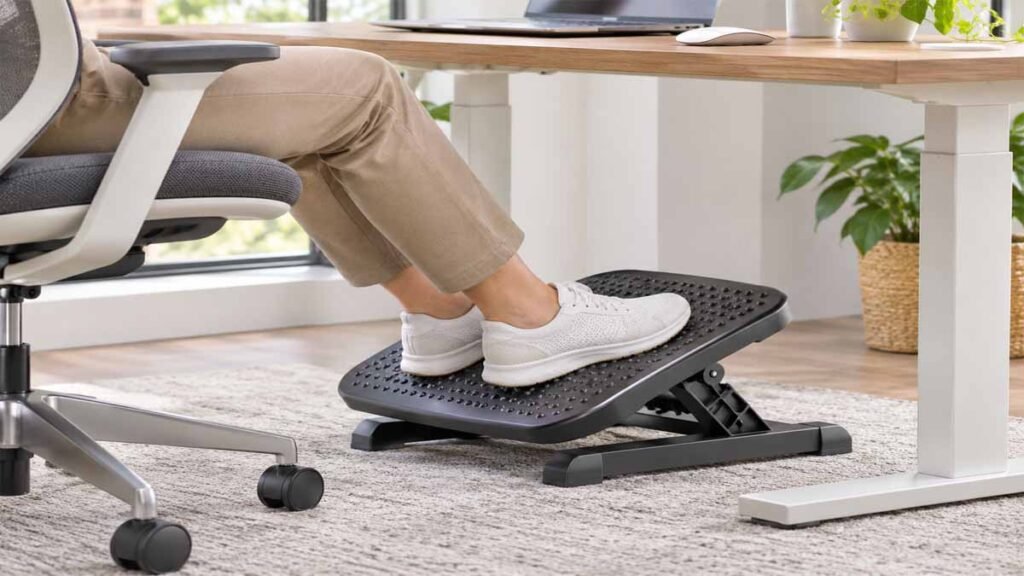
A footrest is useful when your feet don’t rest comfortably on the floor while seated.
This can happen when your chair needs to be raised to place your keyboard at a suitable height.
An adjustable footrest provides a supported surface beneath your feet.
Some models offer height and angle adjustments, while simpler designs maintain one position.
Footrest vs Standing Mat
These accessories serve different purposes.
A standing mat is intended for use while standing.
A footrest usually supports your feet while sitting, although some workstation accessories provide additional resting positions.
Check that the footrest doesn’t interfere with desk legs, wheels, or other equipment.
For a sit-stand workstation, the most important requirement is that your feet remain comfortably supported in the seated position.
How to Choose Standing Desk Accessories for Your Setup
The best accessories depend on how your workstation is arranged.
Rather than purchasing everything at once, begin with an equipment and space assessment.
Step 1: Identify Your Main Problem
Is your monitor too low?
Are cables hanging beneath the desk?
Is your keyboard uncomfortable to reach?
Do you lack storage?
Choose standing desk accessories that address these actual issues.
Step 2: Measure the Desk
Record your desktop width, depth, thickness, and available space underneath.
Check whether the frame or lifting columns restrict mounting positions.
Step 3: Check Equipment Compatibility
Review monitor weights, laptop dimensions, mounting systems, and electrical requirements.
Don’t assume an accessory is compatible just because the product description says it works with standing desks.
Step 4: Prioritize Safety and Comfort
A new accessory shouldn’t create awkward reaching, restrict legroom, or interfere with moving components.
Follow manufacturer instructions, especially for equipment mounted to or beneath an adjustable desktop.
Step 5: Buy in Stages
Start with the highest-priority improvement.
Use your workstation for a while before deciding whether another accessory is necessary.
This approach reduces unnecessary purchases.
Best Standing Desk Accessories by Workspace Type
Different users benefit from different arrangements.
| Workspace | Useful Accessories |
|---|---|
| Laptop-only setup | Laptop stand, external keyboard, desk mat |
| Single-monitor office | Monitor arm, cable tray |
| Dual-monitor workstation | Compatible monitor arms, cable management |
| Small apartment workspace | Compact drawer, headphone holder |
| Desktop PC workstation | Monitor arm, cable tray, compatible CPU holder |
| Shared home office | Adjustable monitor arm, flexible storage |
These are suggested combinations, not fixed requirements.
Budget-Friendly Standing Desk Setup Ideas
You don’t need an expensive collection of accessories to build a useful workstation.
Minimal Setup
Begin with your desk, computer, keyboard, mouse, and suitable lighting.
If everything is already positioned comfortably, no additional purchase may be necessary.
Organization-Focused Setup
Add a cable management tray and a small desktop organizer or drawer.
This may be useful for workstations with several connected devices.
Monitor-Focused Setup
Consider an adjustable monitor arm, an appropriate keyboard position, and a cable routing system.
This combination may be helpful for people who switch between sitting and standing frequently.
Full Workstation Setup
A larger workspace may benefit from monitor arms, cable management, storage, lighting, and equipment mounting accessories.
However, every addition should be compatible with the desk’s weight capacity and movement.
The smartest approach is to purchase fewer items that solve clear problems.
Standing Desk Accessories You May Not Need
Some accessories look attractive in advertisements but provide limited practical value.
Decorative Organizers You Won’t Use
A collection of containers and holders can make the desktop feel crowded.
Choose storage based on the items you actually use.
Oversized Desk Mats
Large mats can cover unnecessary surface area, especially on compact desks.
Measure before purchasing.
Additional Monitor Stands
If your current monitor is already adjustable and positioned comfortably, another stand may offer little benefit.
Complicated Mounting Systems
An accessory that requires incompatible mounting hardware or reduces leg clearance isn’t necessarily a good upgrade.
Multiple Cable Accessories
You may not need several separate cable organizers.
A well-planned tray and suitable routing may already meet your needs.
Common Mistakes When Buying Standing Desk Accessories
Avoid these purchasing mistakes:
Buying before measuring: Check dimensions, thickness, load ratings, and mounting requirements first.
Ignoring moving parts: Equipment attached to a sit-stand desk must allow safe height adjustment.
Blocking computer ventilation: Keep cooling openings clear and follow equipment instructions.
Reducing legroom: Storage and mounts shouldn’t restrict comfortable seated positions.
Choosing appearance over function: Attractive standing desk decor is useful only when it doesn’t compromise usability.
Overloading accessories: Monitor arms, trays, and mounts all have manufacturer-specified limits.
Expecting accessories to solve every comfort problem: Correct workstation positioning and regular movement still matter.
Standing Desk Accessories Checklist Before Buying
Use this quick checklist before ordering a new accessory.
- Does it solve a specific workstation problem?
- Is it compatible with my desk model?
- Will it fit my desktop or mounting location?
- Does it support the weight of my equipment?
- Will it work safely when the desk moves?
- Does it preserve necessary legroom?
- Are installation instructions available?
- Will it be easy to clean and maintain?
- Is the warranty appropriate?
- Can I return it if it doesn’t fit?
Checking these details can help you avoid unnecessary purchases and installation problems.
Frequently Asked Questions
What are the most useful standing desk accessories?
For many computer users, adjustable monitor arms and cable management trays are especially practical. However, the most useful accessories depend on your equipment and workstation setup.
Do I need an anti-fatigue mat?
Not everyone needs one. Some people prefer cushioning when standing on hard floors, but changing positions and taking movement breaks remains important.
Are standing desk monitor arms worth buying?
A compatible monitor arm may be useful if your monitor lacks suitable adjustment or you regularly alternate between sitting and standing.
Can I attach accessories to any standing desk?
No. Mounting compatibility depends on the desktop material, thickness, frame design, load rating, and manufacturer instructions.
What are stand up desk accessories?
Stand up desk accessories are products used to improve the organization, comfort, lighting, equipment positioning, or functionality of standing workstations.
Are under-desk computer holders safe?
They can be suitable when the computer, mounting hardware, desk, and installation method are compatible. Always follow manufacturer instructions and preserve adequate clearance and ventilation.
How can I organize cables on a standing desk?
Start by identifying the equipment connected to your workstation. Use compatible cable organizers, allow for desk movement, and keep cords clear of moving parts.
What standing desk accessories are useful in a small room?
A compact monitor arm, cable tray, headphone hook, or small drawer may help reduce clutter, depending on the available space.
Should I buy standing desk accessories before buying the desk?
Usually, it’s better to select the desk first. Knowing the desktop dimensions, frame structure, and adjustment range makes accessory compatibility easier to evaluate.
Final Thoughts
The right standing desk accessories can make a workstation easier to organize, adjust, and use throughout the day.
For many people, monitor positioning and cable organization are sensible places to start. Other accessories, including mats, drawers, lighting, and equipment mounts, depend on individual needs.
Before purchasing, check compatibility, dimensions, mounting requirements, and available working space.
You don’t need every accessory on the market.
Choose practical additions that solve real problems and fit the way you work.